Skip to content
CCNA Pune.training

Cloud & DevOps

Cloud Computing Course in Pune

This cloud computing course shows you how to design and run infrastructure on AWS and Microsoft Azure: virtual networks, compute, storage, identity, monitoring and cost control, built hands-on in cloud lab accounts. It suits network and system engineers, freshers with IT basics and anyone preparing for AWS Solutions Architect Associate or Azure Administrator.

  • Build real cloud skills through hands-on AWS, Azure and GCP labs
  • Learn the cloud services most organisations now run on
  • Deploy, manage and automate cloud resources with trainer guidance

Cloud Computing

Cloud Computing: quick answers

What is cloud computing in simple terms?
Cloud computing means renting servers, storage, networking and databases from a provider like AWS or Azure on demand, instead of buying and running the hardware yourself.
Should I learn AWS or Azure first?
Learn one deeply, then map the other. We start with AWS because its services are a common reference point, then show the Azure equivalent for every concept so switching is straightforward.
Do I need networking knowledge for cloud?
It helps a lot. VPCs, subnets, route tables, security groups and VPN gateways are networking concepts, which is why network engineers often become strong cloud engineers.
Does cloud computing require coding?
Not heavy coding. You will use the console, the CLI and simple scripts, plus an introduction to infrastructure as code with Terraform.
Which certification does this course prepare me for?
It prepares you for AWS Certified Solutions Architect - Associate and Microsoft Azure Administrator (AZ-104), with Cloud Practitioner or AZ-900 as optional starting points.

Who this course is for

Join if you are…

  • Network engineers who want to design cloud networks
  • Linux and Windows administrators moving workloads to the cloud
  • Freshers with basic networking or Linux knowledge
  • Developers who want to deploy and run their own applications
  • Support engineers working with customers on AWS or Azure

By the end you will be able to…

  • Design a VPC or VNet with public and private subnets, routing and gateways
  • Launch and manage virtual machines, load balancers and auto scaling groups
  • Choose the right storage and database service for a workload
  • Write IAM policies and role assignments that follow least privilege
  • Monitor resources, set alarms and keep monthly costs under control
  • Provision repeatable infrastructure with the CLI and Terraform basics

Cloud Computing syllabus

27 modules, from fundamentals to job-ready practice.
  1. 01

    Cloud Concepts

    • AWS Cloud –: Introduction to cloud computing, its service models (IaaS, PaaS, SaaS), and AWS benefits like scalability, security, and cost efficiency.
    • What is Cloud Computing?: Understanding cloud service models (IaaS, PaaS, SaaS) and their use cases.
    • Benefits of AWS Cloud –: Exploring advantages such as cost savings, agility, security, and scalability.
    • AWS Global Infrastructure –: Overview of AWS Regions, Availability Zones, and Edge Locations for global coverage.
    • AWS Cloud Architecture Principles–: Understanding key design principles for building resilient and scalable applications.
    • High Availability –: Ensuring system uptime using Multi-AZ deployment and Load Balancing.
    • Fault Tolerance & Disaster Recovery –: Implementing backups and replication strategies for system resilience.
    • Elasticity & Scalability –: Leveraging Auto Scaling and serverless architecture for dynamic resource allocation.
    • AWS Shared Responsibility Mode –: Understanding the division of security responsibilities between AWS and customers.
    • AWS vs. Customer Responsibilities –: Clarifying security tasks managed by AWS versus customer-managed controls.
    • Security of the Cloud vs. Security in the Cloud –: Differentiating AWS infrastructure security from customer-side security measures.
  2. 02

    Security and Compliance

    • AWS Security Basics–: Introduction to identity management and access control in AWS.
    • Identity and Access Management (IAM) –: Managing users, roles, and policies for secure access control.
    • Multi-Factor Authentication (MFA) –: Enhancing account security with an additional authentication layer.
    • AWS Organizations and Service Control Policies (SCPs) –: Centralized account management and policy enforcement.
    • Compliance and Governance –: Ensuring best practices and adherence to AWS security standards.
    • AWS Well-Architected Framework (Security Pillar) –: Guidelines for securing cloud workloads based on AWS best practices.
    • AWS Security Services–: AWS tools for threat detection, mitigation, and encryption.
    • AWS Shield & AWS WAF –: Protection against DDoS attacks and web application vulnerabilities.
    • Amazon GuardDuty –: AI-driven threat detection for continuous security monitoring.
    • AWS Key Management Service (KMS) –: Encryption and key management for securing sensitive data.
  3. 03

    Technology (Cloud Computing)

    • AWS Core Services Overview–: Understanding key AWS services across compute, storage, database, and networking.
    • Compute: EC2, Lambda –: Virtual servers (EC2) and serverless computing (Lambda) for scalable applications.
    • Storage: S3, EBS, EFS, Glacier –: Object, block, and archival storage solutions for different use cases.
    • Database: RDS (Aurora, MySQL), DynamoDB, Redshift –: Managed relational, NoSQL, and data warehouse solutions.
    • Networking: VPC, Route 53, Direct Connect, AWS Global Accelerator –: Secure networking, domain management, and optimized traffic routing.
    • AWS Management Tools–: Tools for resource provisioning, automation, and administration.
    • AWS Management Console –: Web-based interface for managing AWS services.
    • AWS Command Line Interface (CLI) –: Command-line tool for automating AWS resource management.
    • AWS CloudFormation –: Infrastructure as Code (IaC) service for automated deployments.
    • Monitoring and Performance Management –: Tools for tracking and optimizing AWS resources.
    • Amazon CloudWatch –: Monitoring service for logs, metrics, and alarms.
    • AWS Trusted Advisor –: Recommends best practices for cost, performance, and security.
    • AWS Config –: Compliance monitoring and change tracking for AWS resources.
  4. 04

    Billing and Pricing

    • AWS Pricing Models –: Cost structures to optimize cloud expenses.
    • On-Demand, Reserved, and Spot Instances –: Different pricing models for compute resources.
    • Free Tier, Pay-As-You-Go, Savings Plans –: Flexible pricing for startups to enterprises.
    • AWS Billing & Cost Management Tools–: Budgeting and expense tracking solutions.
    • AWS Pricing Calculator –: Estimates AWS service costs based on usage.
    • AWS Cost Explorer & Budgets –: Analyzes and forecasts AWS spending.
    • AWS Total Cost of Ownership (TCO) Calculator –: Compares AWS costs with on-premises infrastructure.
    • AWS Support Plans –: Different support tiers for AWS users.
    • Basic, Developer, Business, and Enterprise Support Tiers –: Service levels based on customer needs.
    • AWS Trusted Advisor for Cost Optimization –: Helps reduce costs by identifying underutilized resources.
  5. 05

    Design Secure Architectures

    • AWS Security Best Practices –: Implementing strong security measures in AWS.
    • Shared Responsibility Model –: Clarifying AWS and customer security responsibilities.
    • Security Services: IAM, KMS, Secrets Manager, AWS Shield, AWS WAF –: Key AWS security services for access control and protection.
    • Implementing Least Privilege with IAM Roles, Policies, Groups –: Restricting access based on user needs.
    • Multi-Factor Authentication (MFA) –: Enhancing security with additional authentication layers.
    • Data Encryption at Rest (KMS, SSE, CMK) and In Transit (TLS, SSL) –: Securing data during storage and transmission.
    • Networking Security –: Protecting AWS networking infrastructure.
    • Amazon VPC Design, Subnets, Security Groups, NACLs –: Configuring secure and isolated cloud networks.
    • VPN, AWS Direct Connect, and PrivateLink –: Securely connecting on-premises and cloud environments.
    • AWS Firewall Manager, AWS Security Hub –: Centralized firewall policy management and security monitoring.
    • DDoS Protection with AWS Shield –: Mitigating distributed denial-of-service attacks.
    • Identity Federation Using IAM, AWS SSO –: Enabling secure single sign-on across AWS accounts.
    • Monitoring & Compliance –: Ensuring continuous security monitoring and compliance.
    • AWS CloudTrail, AWS Config –: Logging and auditing AWS resource changes.
    • AWS Inspector, GuardDuty –: Automated vulnerability scanning and threat detection.
    • AWS Well-Architected Framework Security Pillar –: Best practices for designing secure AWS environments.
  6. 06

    Design Resilient Architectures

    • High Availability & Fault Tolerance –: Ensuring system reliability through redundancy and load balancing.
    • Multi-AZ vs. Multi-Region Deployments –: Enhancing availability with geographically distributed infrastructure.
    • Amazon Route 53 for DNS Failover –: Automatic failover to backup systems during outages.
    • Load Balancing Using ALB, NLB, and CLB –: Distributing traffic efficiently across resources.
    • Auto Scaling Groups (ASG) with Dynamic and Scheduled Scaling –: Automatic resource scaling based on demand.
    • AWS Global Accelerator –: Optimizing performance and failover across AWS Regions.
    • Storage Resilience–: Ensuring data durability and disaster recovery readiness.
    • Amazon S3 Durability and Replication –: Highly available object storage with built-in redundancy.
    • S3 Storage Classes and Lifecycle Policies –: Cost optimization through intelligent data tiering.
    • AWS Backup and Disaster Recovery Strategies –: Automating backups and implementing recovery mechanisms.
    • Compute Resilience–: Designing fault-tolerant and scalable compute environments.
    • Elastic IPs, Spot & Reserved Instances –: Ensuring availability and cost efficiency in EC2.
    • AWS Lambda and Serverless Design Patterns –: Resilient serverless application architectures.
    • ECS vs. EKS for Containerized Applications –: Choosing the right container orchestration service.
  7. 07

    Design High-Performing Architectures

    • Compute Performance –: Optimizing compute resources for efficiency and scalability.
    • Choosing the Right EC2 Instance Type –: Selecting instances based on workload requirements.
    • AWS Lambda Scaling and Optimization –: Enhancing performance in serverless applications.
    • AWS Fargate vs. EC2 for Containers –: Serverless vs. self-managed container deployment.
    • Storage Performance–: Optimizing storage services for high-speed data access.
    • Amazon EBS vs. Instance Store –: Comparing persistent and ephemeral storage for EC2.
    • Amazon Elastic File System (EFS) –: Scalable file storage for multi-instance access.
    • Database Performance –: Designing efficient, scalable, and high-performing databases.
    • Amazon RDS (Aurora, MySQL, PostgreSQL, Oracle, SQL Server) –: Managed relational database solutions.
    • DynamoDB (On-Demand, Provisioned Capacity, DAX) –: High-performance NoSQL database options.
    • Amazon Redshift for Data Warehousing –: Optimized analytics processing for big data.
    • Amazon ElastiCache (Redis, Memcached) –: In-memory caching for reducing latency.
    • Network Performance–: Enhancing connectivity and reducing latency across AWS environments.
    • Amazon CloudFront Caching and Distribution –: Content delivery network (CDN) for faster access.
    • AWS Direct Connect for High-Speed Networking –: Dedicated network connection for low-latency communication.
    • VPC Peering vs. Transit Gateway –: Connecting AWS networks securely and efficiently.
    • Messaging Services – SNS and SQS –: Decoupling applications for better scalability.
    • Working of SNS and SQS –: Enabling event-driven architecture with messaging services.
    • Important Components of SNS and SQS –: Understanding topics, queues, and message delivery.
    • Creating and Managing Topics in SNS and SQS –: Setting up communication channels for distributed systems.
    • Adding Subscribers in SNS –: Enabling notifications and event-driven workflows.
  8. 08

    Manage Azure Identities and Governance

    • Manage Microsoft 365 Users and Groups
    • Administer users, groups, licenses, and access in Microsoft 365.
    • Create users and groups
    • Set up and organize users and security groups in Microsoft 365.
    • Manage user and group properties
    • Modify user attributes, group settings, and permissions.
    • Manage licenses in Microsoft 365
    • Assign, remove, and monitor license usage.
    • Manage external users
    • Configure guest access and security policies for external users.
    • Configure self-service password reset (SSPR)
    • Enable users to reset passwords independently.
    • Manage Access to Azure Resources
    • Control resource access with role-based access control (RBAC).
    • Manage built-in Azure roles
    • Assign predefined roles to manage permissions.
    • Assign roles at different scopes
    • Set role assignments at resource, group, or subscription levels.
    • Interpret access assignments
    • Analyze permissions and troubleshoot access issues.
    • Manage Azure Subscriptions and Governance
    • Organize and optimize Azure resource usage.
    • Implement and manage Azure Policy
    • Enforce compliance with automated rules.
    • Configure resource locks
    • Prevent accidental deletion or modification of critical resources.
    • Apply and manage tags on resources
    • Categorize and track Azure resources.
    • Manage resource groups
    • Organize and structure resources for better management.
    • Manage subscriptions
    • Administer Azure subscription settings and policies.
    • Manage costs using alerts, budgets, and Azure Advisor
    • Monitor and control cloud spending.
    • Configure management groups
    • Structure multiple subscriptions under centralized governance.
  9. 09

    Implement and Manage Storage

    • Configure Access to Storage
    • Securing and managing access to Azure storage services.: Configure Azure Storage Firewalls and Virtual Networks – Restricting access to storage resources.
    • Create and Use Shared Access Signature (SAS) Tokens – Granting temporary access to storage.
    • Configure Stored Access Policies – Controlling access permissions at a granular level.
    • Manage Access Keys – Handling storage authentication keys securely.
    • Configure Identity-Based Access for Azure Files – Using Azure Active Directory for secure file access.
    • Configure and Manage Storage Accounts
    • Managing Azure storage services for efficiency and security.
    • Create and Configure Storage Accounts – Setting up and managing Azure storage services.
    • Configure Azure Storage Redundancy – Ensuring data availability with replication.
    • Configure Object Replication – Automatically replicating objects across storage accounts.
    • Configure Storage Account Encryption – Securing stored data with encryption mechanisms.
    • Manage Data Using Azure Storage Explorer and AzCopy – Handling data movement and management tools.
    • Configure Azure Files and Azure Blob Storage
    • Managing file and object storage solutions.
    • Create and Configure a File Share in Azure Storage – Setting up network file shares in Azure.
    • Create and Configure a Container in Blob Storage – Managing object storage in Azure Blob.
    • Configure Storage Tiers – Optimizing cost and performance with tiered storage.
    • Configure Snapshots and Soft Delete for Azure Files – Protecting file shares from accidental deletion.
    • Configure Blob Lifecycle Management – Automating data retention policies.
    • Configure Blob Versioning – Tracking and restoring previous object versions.
  10. 10

    Deploy and Manage Azure Compute Resources

    • Automate Deployment of Resources
    • Streamlining infrastructure deployment with code.
    • Interpret and Modify Azure Resource Manager (ARM) Templates or Bicep Files – Understanding infrastructure as code.
    • Deploy Resources Using Templates or Bicep Files – Automating resource provisioning.
    • Export a Deployment as a Template or Convert a Template to a Bicep File – Reusing configurations for consistency.
    • Create and Configure Virtual Machines
    • Deploying and managing virtualized workloads.
    • Create a Virtual Machine – Setting up and launching a new VM in Azure.
    • Configure Azure Disk Encryption – Securing VM data with encryption.
    • Move a Virtual Machine – Migrating VMs across resource groups or subscriptions.
    • Manage Virtual Machine Sizes and Disks – Optimizing VM performance and storage.
    • Deploy Virtual Machines to Availability Zones and Sets – Ensuring high availability with redundancy.
    • Deploy and Configure Azure Virtual Machine Scale Sets – Scaling VMs dynamically based on demand.
    • Provision and Manage Containers
    • Deploying containerized applications in Azure.: Create and Manage an Azure Container Registry – Storing and managing container images.
    • Provision Containers Using Azure Container Instances (ACI) and Azure Kubernetes Service (AKS) – Running containerized workloads efficiently.
  11. 11

    Apps

    • Manage Sizing and Scaling for Containers
    • Optimizing container performance by adjusting resource allocation.
    • Create and Configure Azure App Service
    • Deploying and managing web applications in Azure.
    • Provision an App Service Plan – Allocating resources for hosting applications.
    • Configure Scaling, Certificates, TLS, and Backup for an App Service – Ensuring security, availability, and disaster recovery.
    • Configure Networking Settings, Deployment Slots, and Custom DNS – Managing app connectivity and version control.
  12. 12

    Implement and Manage Virtual Networking

    • Configure Secure Access to Virtual Networks
    • Protecting Azure networks with security controls.
    • Create and Configure Network Security Groups (NSGs) and Application Security Groups – Defining security rules at the network and application levels.
    • Evaluate Effective Security Rules in NSGs – Assessing the impact of security policies.
    • Implement Azure Bastion – Enabling secure remote access to VMs.
    • Configure Service Endpoints for Azure PaaS – Securing PaaS resources within a virtual network.
    • Configure Private Endpoints for Azure PaaS – Restricting PaaS service access to private networks.
    • Configure Name Resolution and Load Balancing
    • Managing DNS and distributing traffic efficiently.
    • Configure Azure DNS – Hosting custom domain names in Azure.
    • Configure an Internal or Public Load Balancer – Distributing traffic across multiple resources.
    • Troubleshoot Load Balancing – Identifying and fixing load distribution issues.
  13. 13

    Monitor and Maintain Azure Resources

    • Monitor Resources in Azure
    • Tracking and analyzing performance across cloud resources.
    • Interpret Metrics in Azure Monitor – Analyzing performance and usage data.
    • Configure Log Settings in Azure Monitor – Capturing system logs for troubleshooting.
    • Query and Analyze Logs in Azure Monitor – Extracting insights from monitoring data.
    • Set Up Alert Rules, Action Groups, and Alert Processing Rules in Azure Monitor – Automating incident detection and response.
    • Configure and Interpret Monitoring of Virtual Machines, Storage Accounts, and Networks Using Azure Monitor Insights – Gaining deep visibility into resource health.
    • Use Azure Network Watcher and Connection Monitor – Diagnosing and troubleshooting network connectivity issues.
  14. 14

    Implement Backup and Recovery

    • Create a Recovery Services Vault
    • Setting up a secure storage location for backup and disaster recovery.
    • Create an Azure Backup Vault
    • Configuring a centralized vault for managing Azure backups.
    • Create and Configure a Backup Policy
    • Defining automated backup schedules and retention settings.
    • Perform Backup and Restore Operations Using Azure Backup
    • Ensuring data protection through scheduled backups and recovery.
    • Configure Azure Site Recovery for Azure Resources
    • Enabling disaster recovery and business continuity.
    • Perform a Failover to a Secondary Region Using Site Recovery
    • Ensuring minimal downtime during disasters.
    • Configure and Interpret Reports and Alerts for Backups
    • Monitoring backup health, failures, and recovery status with automated notifications.
  15. 15

    Overview of Cloud & Google Cloud Platform

    • Cloud Overview & Characteristics
    • Understanding the key features and benefits of cloud computing.
    • Cloud Service Model (IaaS, PaaS, SaaS)
    • Exploring different cloud service offerings and their use cases.
    • Cloud Deployment Model (Public, Private, Hybrid)
    • Understanding various cloud deployment strategies.
    • Google Cloud Platform (GCP) Infrastructure Overview
    • Examining the global infrastructure of GCP.
    • Create GCP Account & Console Overview
    • Setting up and navigating the Google Cloud Console.
    • Organizations, Folders, Projects, Resources & Billing
    • Managing resources and cost in GCP.
    • Google Cloud Architecture Framework
    • Understanding best practices for designing cloud solutions on GCP.
  16. 16

    Virtual Machines

    • Compute Engine (VM): Types & Options
    • Exploring different virtual machine options in GCP.
    • VM Instance Lifecycle & Common Operations
    • Managing VM instances from creation to deletion.
    • Machine Types & Compute Options (vCPU and Memory) in Compute Engine
    • Choosing the right compute resources based on workloads.
    • Images & Snapshots
    • Managing VM backups and creating custom machine images.
    • Disk Types: Local SSD, Persistent & Balanced
    • Understanding different storage options for VM performance optimization.
  17. 17

    Virtual Networks

    • Virtual Private Cloud (VPC) & Types, Subnets
    • Configuring and managing network segmentation in GCP.
    • IP Addresses (Public/Private), NIC
    • Assigning and managing network interfaces and IP addresses.
    • Routes & Route Table
    • Defining traffic flow between networks.
    • Firewalls
    • Implementing security rules for controlling inbound and outbound traffic.
    • Network Topology Options
    • Understanding different networking architectures in GCP.
  18. 18

    Cloud IAM

    • IAM Basics: Authentication, Authorization & MFA
    • Managing identity and access control in GCP.
    • Roles, Members, Service Account, Policy
    • Assigning permissions and securing cloud resources.
    • Resource Hierarchy
    • Organizing and managing GCP resources efficiently.
    • Cloud IAM Best Practices
    • Implementing security best practices for access management.
  19. 19

    Data Storage Services

    • Google Cloud Storage Overview & Structure
    • Understanding object storage and its use cases.
    • Storage Classes, Versioning & Lifecycle Policies
    • Managing cost and data retention with storage classes.
    • Cloud SQL for Database (MySQL, PostgreSQL, and SQL Server)
    • Using managed relational databases on GCP.
    • Cloud Spanner: Fully Managed Relational DB
    • Leveraging a scalable and globally distributed database.
    • Cloud Datastore
    • Using a NoSQL database for web and mobile applications.
    • Cloud Bigtable: NoSQL Big Data Service
    • Storing and analysing large-scale data in real time.
  20. 20

    App Engine, Functions, Cloud Run

    • App Engine: Serverless Web Apps
    • Deploying fully managed web applications without infrastructure management.
    • App Engine Environments: Standard vs. Flexible
    • Understanding the differences between environment types for scalability.
    • Cloud Functions: Events & Triggers
    • Running event-driven serverless functions in response to cloud events.
    • Cloud Run: Serverless Containers
    • Deploying and managing stateless containerized applications.
  21. 21

    Resource Management

    • Cloud Resource Manager Overview
    • Organizing and managing cloud resources efficiently.
    • Quotas, Labels, Names & Billing
    • Managing usage limits, resource tagging, and cost allocation.
  22. 22

    Resource Monitoring

    • Stackdriver: Cloud Monitoring & Logging
    • Collecting, analyzing, and visualizing metrics and logs.
    • Logging, Error Reporting, Tracing, Debugging
    • Monitoring application performance and troubleshooting issues.
  23. 23

    Interconnecting Networks

    • Virtual Private Network (VPN) & Its Types
    • Securely connecting on-premises and cloud networks.
    • VPC Peering (Public & Private)
    • Establishing private communication between different VPC networks.
    • Cloud DNS, Cloud Interconnect & Cloud Router
    • Managing domain resolution, hybrid connectivity, and dynamic routing.
  24. 24

    Load Balancing & Autoscaling

    • Load Balancing Types: Internal, External, Global & Regional
    • Distributing traffic for high availability and reliability.
    • HTTPS, Network, SSL & TCP Load Balancers
    • Enhancing security and optimizing traffic distribution.
    • Cross-Region and Content-Based Load Balancing
    • Ensuring efficient global traffic management.
    • Autoscaling Policies & Configuration
    • Dynamically adjusting resources based on demand.
  25. 25

    Google Kubernetes Engine (GKE)

    • Microservices, Containers, Docker & Kubernetes
    • Understanding containerized applications and orchestration.
    • GCP Kubernetes Engine (GKE) & Its Relationship with Kubernetes
    • Deploying and managing containerized workloads on GCP.
    • Kubernetes Architecture: Clusters, Nodes, Node Pools, Pods, Services
    • Managing Kubernetes components for scalable applications.
    • Deploy & Manage Workloads on GKE
    • Running, scaling, and maintaining containerized applications.
  26. 26

    Maintenance & Monitoring

    • Capacity Planning and Cost Optimization
    • Managing cloud resources efficiently while minimizing costs.
    • Deployment, Monitoring, Alerting, and Incident Response
    • Ensuring application uptime and proactive issue resolution.
    • Monitoring and Alerting
    • Setting up alerts for system health and performance tracking.
  27. 27

    Cloud Migrations

    • Understanding Migration Use Cases
    • Identifying scenarios for cloud migration.
    • Understanding Migration Tools and Process
    • Exploring GCP migration tools and methodologies.
    • Migrating Google Instances to AWS
    • Transferring workloads between Google Cloud and AWS.
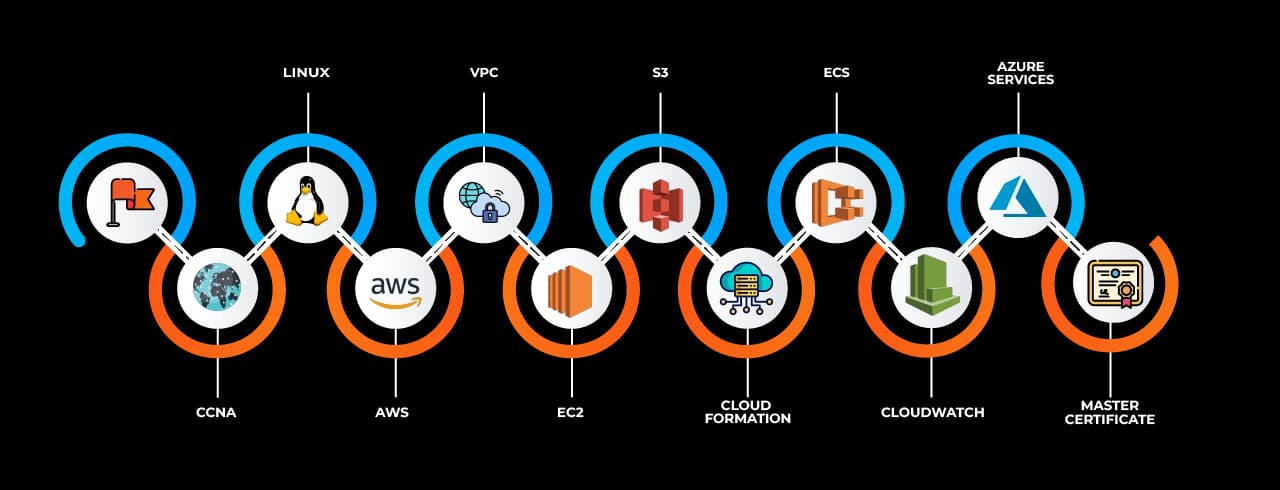
Cloud Computing Course learning curve
Cloud Computing learning curve

Tools you'll work with

  • AWS SDKsSoftware development kits that allow developers to integrate AWS services into applications using various programming languages.
  • CloudWatchA monitoring service that collects and analyzes logs, metrics, and events for AWS resources and applications.
  • CloudTrailA service that records AWS API calls for governance, compliance, and operational auditing.
  • IAM (Identity and Access Management)A security service for managing user access, permissions, and authentication in AWS.
  • CognitoA service for adding authentication, authorization, and user management to web and mobile applications.
  • InspectorAn automated security assessment service that detects vulnerabilities in AWS workloads.
  • MacieA data security service that uses AI to discover and protect sensitive data across AWS.
  • CloudHSMA managed hardware security module for cryptographic key storage and encryption.
  • CloudFormationAn infrastructure-as-code service that automates the provisioning of AWS resources using templates.
  • OpsWorksA configuration management service that automates deployments using Chef and Puppet.
  • CodeDeployA service that automates application deployments across AWS and on-premises environments.
  • CodePipelineA CI/CD service that automates the build, test, and deployment processes for applications.
  • Elastic BeanstalkA platform-as-a-service (PaaS) that simplifies application deployment and management.
  • DynamoDBA fully managed NoSQL database service for high-speed and scalable applications.
  • IaaS (Infrastructure as a Service)A cloud model that provides virtualized computing resources over the internet.
  • PaaS (Platform as a Service)A cloud model offering development and deployment environments without managing infrastructure.
  • SaaS (Software as a Service)A cloud model where software applications are delivered over the internet on a subscription basis.
  • AWS Management ConsoleAn easy-to-use web-based console of AWS services and resources
  • AWS CLIA command-line interface tool that automates various AWS-related processes through the execution of commands and scripts.
  • S3 (Simple Storage Service)A flexible object storage service designed for secure data storage and retrieval.
  • EBS (Elastic Block Store)A robust block storage service tailored for EC2 instances.
  • RDS (Relational Database Service)A fully managed relational database service that supports various database engines.

Projects you'll build

  • VPC Setup with Security Groups

    VPC Setup with Security Groups

    Design a secure virtual private cloud with public and private subnets, a NAT gateway, security groups and EC2 instances.
    • LOAD BALANCER
    • CloudWatch
    • AWS BACKUP
  • IAM Role & Policy Management

    IAM Role & Policy Management

    Set up IAM users, roles and policies that follow least privilege, then test that each role can do only what it needs.

    • AWS BACKUP
    • LOAD BALANCER
    • CloudWatch
  • Static Website Hosting on S3

    Static Website Hosting on S3

    Host a static website from an S3 bucket with the right access policies and put CloudFront in front of it for fast, low-cost global delivery.

    • S3 (Simple Storage Service)
    • AWS Management Console
    • HTML & HTML5
  • Serverless Portfolio Website

    Serverless Portfolio Website

    Build a portfolio site without managing any servers, using Lambda for logic, API Gateway for endpoints, DynamoDB for visitor data and S3 for files.
    • DynamoDB
    • S3 (Simple Storage Service)
    • AWS Management Console
  • Multi-Tier Architecture

    Multi-Tier Architecture

    Deploy a three-tier web application with separate web, application and database layers on EC2 and RDS, behind a load balancer for high availability.

    • Inspector
    • RDS (Relational Database Service)
    • EBS (Elastic Block Store)

What a lab session looks like

lab-session
student@lab:~$ aws ec2 create-vpc --cidr-block 10.20.0.0/16 --query Vpc.VpcId"vpc-0a1b2c3d4e5f67890"student@lab:~$ VPC=vpc-0a1b2c3d4e5f67890student@lab:~$ aws ec2 create-subnet --vpc-id $VPC --cidr-block 10.20.1.0/24    "SubnetId": "subnet-0123456789abcdef0",    "State": "available",student@lab:~$ aws ec2 describe-vpcs --query 'Vpcs[].CidrBlock' --output text172.31.0.0/16   10.20.0.0/16student@lab:~$ 
Creating a lab VPC and subnet from the AWS CLI, then confirming it alongside the account's default VPC.

Certification path

  1. 1

    Cloud basics (optional)

    AWS Certified Cloud Practitioner or Microsoft AZ-900 if you are completely new to cloud concepts.

  2. 2

    Associate level

    AWS Certified Solutions Architect - Associate (SAA-C03) or Microsoft Azure Administrator (AZ-104).

  3. 3

    Specialise

    AWS Advanced Networking, Security Specialty or Azure Network Engineer (AZ-700), depending on your focus.

  4. 4

    Professional level

    AWS Solutions Architect - Professional or Azure Solutions Architect Expert after real project experience.

Job roles after this course

  • Cloud Architect
  • DevOps Engineer (Multi-Cloud)
  • Cloud Security Engineer
  • Cloud Operations Manager
  • Cloud Consultant
  • Cloud Systems Administrator
  • Cloud Application Developer
  • Cloud Migration Specialist
  • Cloud Product Manager
  • Cloud Engineer
  • Site Reliability Engineer (SRE)

Enquire about this course

Request a call back

A counsellor replies with the right course, current fees and batch details.

We only use these details to reply to your enquiry.

About the Cloud Computing course

About the Cloud Computing course

This course is for people who want to understand how modern systems really run. Most organisations no longer keep large server rooms; they run on cloud platforms. Exploring those platforms alone can feel like standing in a control room full of unlabelled switches, so we give you a map first.

We begin with problems you will recognise from real workplaces: slow applications, servers failing at night, storage running out and sudden traffic spikes. Then we show how AWS, Azure and Google Cloud handle each of them more simply.

Once that picture settles in your mind, the sessions become more hands-on.

Your first sessions cover what a cloud account looks like, where resources live, how permissions work and what each platform expects from you.

The early labs are deliberately small: launch a virtual machine, store files in object storage, build a simple network or deploy a lightweight app. Each one builds confidence without overload.

Once you are comfortable, we move to bigger services: load balancing, serverless functions, managed databases, logging and cost control.

Throughout, the aim is for you to understand why each service exists, not just where to click.

Many learners find cloud computing surprisingly intuitive once they see the logic behind it.


Why cloud skills matter now

Cloud has quietly become the backbone for almost every company.

Online shops, hospitals, banks, start-ups and even simple internal tools all rely on cloud systems in some way.

Managers want apps that load fast, scale automatically, and stay secure.

Teams want fewer headaches with hardware and software maintenance.

That’s why cloud roles have increased across multiple areas:

  • Developers who deploy applications without heavy infrastructure
  • System administrators who now look after cloud servers instead of physical ones
  • Data teams working with cloud analytics tools
  • Network teams managing VPCs, firewalls and access control
  • Automation and DevOps teams running CI/CD pipelines
  • Graduates preparing for AWS, Azure or Google Cloud certifications


Even non-technical roles benefit from cloud awareness because so much work has moved online.

The course gives you a broad, practical view of the cloud so you can move into different cloud roles with confidence.


How we teach cloud computing

The training atmosphere feels more like a guided workshop than a typical classroom lecture.

Our trainers have worked on real cloud projects such as migrations, deployments and cost reviews, so their explanations come from practice rather than slides.

Batch sizes are intentionally small.

The lab set-up lets you experiment, break things safely, ask the questions that come up along the way and repeat an exercise until it sticks.

We also spend time on choosing the right platform for a job, for example:

  • AWS for large-scale deployments and flexible compute options
  • Azure for companies already using Microsoft environments
  • GCP for fast serverless apps, data pipelines, and simpler integrations


Because you work on all three platforms, you see where they are alike and where the differences matter.


What makes this course practical

A few things students usually appreciate:

  • Hands-on focus: More practical tasks, fewer theory slides.
  • Multi-cloud exposure: AWS, Azure, and GCP covered with real scenarios.
  • Realistic examples: Small deployments, storage setups, networking, IAM.
  • Trainer guidance: Help with fixing errors and understanding why something broke.
  • Practical assignments: Small projects across all three cloud platforms.
  • Flexible modes: Classroom and online batches available.
  • Career support: Help with certifications, interviews, and presentations.


By the end, most learners can open any of the major cloud consoles and set up resources on their own with confidence.


What you explore in this programme

The course moves in a smooth, logical flow, so beginners don’t feel overwhelmed:

1. Cloud Basics

– What cloud computing actually solves

– Differences between IaaS, PaaS, and SaaS

– Overview of AWS, Azure, and GCP ecosystems


2. Compute Services

– Creating virtual machines

– Using autoscaling and load balancers

– Small deployments of apps across platforms


3. Storage & Databases

– Object storage (S3, Azure Blob, GCP Storage)

– Managed databases (RDS, Cloud SQL, Azure SQL)

– Backup and lifecycle management


4. Networking Fundamentals

– VPCs, subnets, NAT, firewalls

– Public vs private access

– Cloud DNS and routing basics


5. Serverless & Modern Tools

– AWS Lambda, Azure Functions, GCP Cloud Functions

– Small automation tasks and event triggers


6. IAM & Security Essentials

– Roles, policies, permissions

– Best practices for safe access


7. Monitoring & Cost Control

– Logging setups

– Alerts and performance checks

– Keeping costs under control without breaking performance

Along the way you work on small, realistic cases: deploying a basic website, setting up secure access for a team, automating routine tasks and building simple pipelines.


Can you learn cloud computing online?

Yes, and it works well, because cloud platforms are designed to be used remotely in the first place.

Online sessions are live, so you can share your screen, get errors fixed on the spot and go over difficult parts again without being rushed.

If you miss a class, you get access to the recording.

All the labs, exercises, and project tasks from the classroom sessions are also provided online.

Many working professionals choose online batches because they fit around work while still giving full hands-on practice.


Cloud training for company teams

Yes, companies often request customised cloud training for their tech teams.

Some teams need AWS, some need Azure because their systems run on Microsoft tools, and some want Google Cloud for data-heavy work.

Before we start, we look at the team's current way of working, including deployment patterns, security requirements and skill levels, and plan the sessions around it.

Corporate batches focus on:

  • Smoother deployments
  • Reducing downtime
  • Better security and IAM practices
  • Cost optimisation
  • Team-wide cloud confidence


Online or on-site, sessions combine guided practice, short tasks and quick troubleshooting, so learning fits into the working day instead of sitting apart from it.

Cloud Computing FAQs

Can a fresher learn cloud computing without experience?

Yes, if you are comfortable with basic networking and Linux, which we cover early in the course. Freshers who build and document a few real cloud projects in their lab accounts stand out far more than those with a certificate alone.

Is AWS or Azure better for jobs in Pune?

Both are widely used, and many companies run a mix. We teach AWS in depth and map every concept to Azure, so you can target either and talk confidently about both in interviews.

Will I need to pay for cloud accounts during the course?

Most labs fit within the providers' free tiers or low-cost usage, and we show you how to set budgets and clean up resources so nothing keeps billing. Ask the counsellor how lab accounts are handled for your batch.

Is cloud computing a good career after CCNA?

It is one of the most natural next steps. Cloud networking is still routing, subnets and security policy, so CCNA holders understand VPC design faster than most and can grow into cloud network engineer roles.

What are the cloud course fees and duration?

Fees, duration and batch timings depend on the intake and the track you choose, so we do not publish fixed numbers here. The enquiry form or a quick call gets you the latest details.

Does this course cover DevOps as well?

It introduces Docker, Git and Terraform where they support cloud work, but full CI/CD pipelines and Kubernetes are covered in our DevOps course. Many learners take cloud first and DevOps next.

Do you help with cloud job interviews?

Yes. We run mock interviews on architecture scenarios and troubleshooting, review your resume and project write-ups, and share relevant openings. The job itself is earned by you, and we help you prepare well for it.

Page last reviewed on .