
Skip to content
CCNA Pune.training

Security

Cyber Security Course in Pune

This cyber security course teaches you to defend networks and systems the way a security team actually works: network security, Linux and Windows hardening, ethical hacking, web application testing and SOC monitoring, practised in an isolated lab. It suits networking learners, IT support staff and graduates targeting Security+ and a first security analyst role.

  • Good security is built in layers, not as a single wall.
  • The first job of a security professional is to stop attacks before they land.
  • People, process and technology have to work together to keep an organisation safe.

CyberSecurity Course

Cyber Security: quick answers

What does a cyber security course cover?
It covers how attacks work and how to stop them: network security, system hardening, vulnerability scanning, ethical hacking, web application security, log monitoring and incident response.
Do I need CCNA before cyber security?
Not formally, but you do need networking basics. If you cannot read an IP address, a port number and a packet capture, security tools will not make sense, so we cover those foundations first.
Is ethical hacking legal?
Yes, when you have written permission to test the system. All attack practice in this course happens on lab machines built for that purpose, never on real organisations.
Which certification does this course prepare me for?
It prepares you for CompTIA Security+ (SY0-701) and builds the base for later certifications such as CEH, CySA+ or OSCP.
What is a SOC analyst?
A SOC analyst works in a security operations centre watching alerts and logs, separating real attacks from noise and escalating incidents. It is one of the most common entry-level security roles.

Who this course is for

Join if you are…

  • CCNA learners and network engineers who want to specialise in security
  • IT support and system administration staff moving into security operations
  • Graduates in computer science, IT or electronics aiming for SOC analyst roles
  • Developers who want to understand how their applications get attacked
  • Career changers with solid computer skills and a methodical mindset

By the end you will be able to…

  • Explain the CIA triad, common attack types and how defences map to each
  • Harden Linux and Windows hosts and audit them for weak configurations
  • Run reconnaissance, scanning and vulnerability assessment with Nmap and Nessus-style tools
  • Test web applications for OWASP Top 10 flaws using Burp Suite
  • Analyse logs and packet captures to spot suspicious behaviour
  • Follow an incident response process and write a clear incident report

Cyber Security syllabus

10 modules, from fundamentals to job-ready practice.
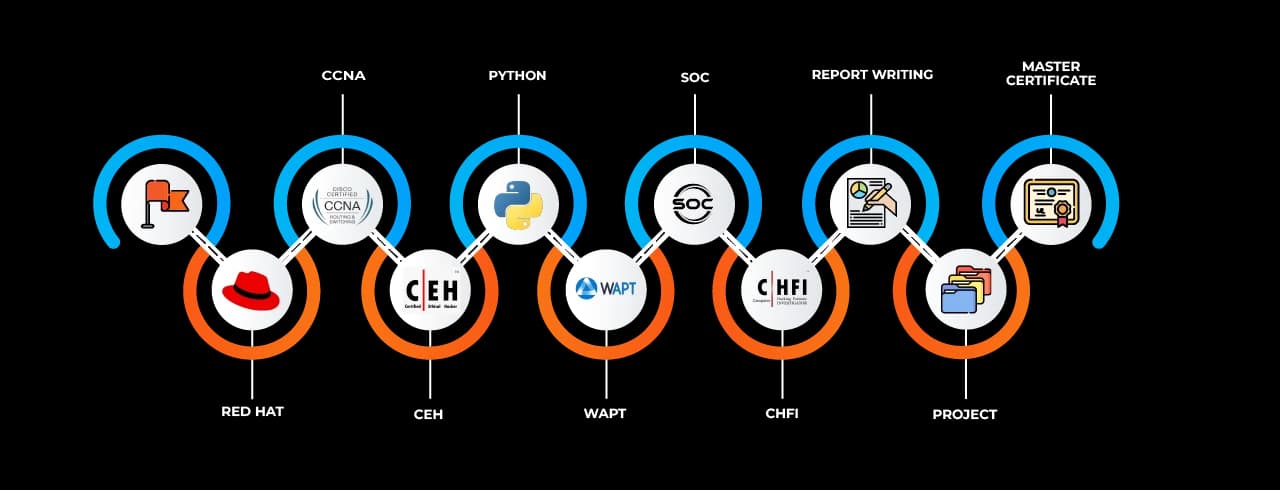
  1. 01

    CCNA

    • CCNA
    • 1.0 Network Fundamentals
    • Computer network fundamentals encompass the study of protocols, hardware, and security.
    • 2.0 Network Access
    • Network access refers to a user's ability to connect to an information system via a network.
    • 3.0 IP Connectivity
    • IP connectivity is the way of transferring data from devices across the internet using the Internet Protocol (IP).
    • 4.0 IP Services
    • IP services are protocols and functionalities that may be added to network devices, such as switches and routers, to enhance their usefulness.
    • 5.0 Security Fundamentals
    • Security foundations include confidentiality, integrity, and availability, as well as authentication, authorisation, and non-repudiation.
    • 6.0 Automation and Programmability
    • A machine, equipment, or system's programmability refers to its ability to be controlled by a computer program. Programming is typically done by a single individual. Automation is the use of machines, equipment, or systems to carry out a task without direct human intervention.
    • 7.0 Routing and Switching
    • Routing and switching are key functionalities of computer networks that allow data to be transmitted between devices and networks.
  2. 02

    IP Services

    • Configure and Verify Inside Source NAT Using Static and PoolsDescription: Maps private IP addresses to public ones for outbound internet access using static or dynamic allocation.
    • Configure and Verify NTP Operating in a Client and Server ModeDescription: Synchronizes system clocks across devices to ensure accurate timekeeping in a network.
    • Explain the Role of DHCP and DNS Within the NetworkDescription: DHCP assigns IP addresses automatically, while DNS translates domain names into IP addresses.
    • Explain the Function of SNMP in Network OperationsDescription: Monitors and manages network devices by collecting and analyzing performance data.
    • Describe the Use of Syslog Features Including Facilities and LevelsDescription: Logs and categorizes system messages based on severity for troubleshooting and auditing.
    • Configure and Verify DHCP Client and RelayDescription: Ensures dynamic IP allocation across different network segments by forwarding DHCP requests.
    • Explain the Forwarding Per-Hop Behavior (PHB) for QoSDescription: Controls traffic prioritization using classification, marking, queuing, congestion management, policing, and shaping.
    • Configure Network Devices for Remote Access Using SSHDescription: Secures remote device management by encrypting command-line access.
    • Describe the Capabilities and Function of TFTP/FTP in the NetworkDescription: Enables file transfer between network devices for configuration backups, software upgrades, and file sharing.
  3. 03

    Security Fundamentals

    • Define Key Security ConceptsDescription: Identifies security risks, including threats, vulnerabilities, exploits, and mitigation techniques.
    • Describe Security Program ElementsDescription: Covers user awareness, training, and physical access controls to enhance security
    • Configure Device Access Control Using Local PasswordsDescription: Restricts unauthorized access by setting up login credentials on network devices.
    • Describe Security Password Policy ElementsDescription: Enforces strong passwords, multi-factor authentication, certificates, and biometrics for secure access.
    • Describe Remote Access and Site-to-Site VPNsDescription: Enables encrypted communication over public networks for secure remote connectivity.
    • Configure and Verify Access Control Lists (ACLs)Description: Filters network traffic by allowing or denying packets based on defined security rules.
    • Configure Layer 2 Security FeaturesDescription: Protects networks from spoofing and attacks using DHCP snooping, dynamic ARP inspection, and port security.
    • Differentiate Authentication, Authorization, and Accounting ConceptsDescription: Defines how users are verified (authentication), assigned permissions (authorization), and tracked (accounting).
    • Describe Wireless Security Protocols (WPA, WPA2, and WPA3)Description: Implements encryption and authentication to secure wireless communications.
    • Configure WLAN Using WPA2-PSK Using the GUIDescription: Sets up wireless security using WPA2 with a pre-shared key via a graphical user interface.
  4. 04

    Automation and Programmability

    • Explain How Automation Impacts Network ManagementDescription: Reduces manual tasks, improves efficiency, and minimizes configuration errors through automated workflows.
    • Compare Traditional Networks with Controller-Based NetworkingDescription: Traditional networks rely on manual configuration, while controller-based networking centralizes control for better scalability.
    • Describe Controller-Based and Software-Defined ArchitecturesDescription: Uses overlays and underlays to create flexible and programmable network infrastructures.
    • Separation of Control Plane and Data PlaneDescription: Decouples decision-making (control) from packet forwarding (data) for better network efficiency.
    • North-Bound and South-Bound APIsDescription: North-bound APIs interact with applications, while south-bound APIs manage network devices.
    • Compare Traditional Campus Device Management with Cisco DNA CenterDescription: Cisco DNA Center enables centralized automation and AI-driven insights for network management.
    • Describe Characteristics of REST-Based APIsDescription: Uses CRUD operations, HTTP methods, and structured data formats like JSON and XML for communication.
    • Recognize the Capabilities of Configuration Management Tools (Puppet, Chef, Ansible)Description: Automates network provisioning, configuration, and maintenance for consistency.
    • Interpret JSON Encoded DataDescription: Reads and processes structured JSON data for network automation and API interactions.
  5. 05

    LINUX

    • RH124 - Red Hat System
    • Administration I
    • Red Hat System Administration I (RH124) is targeted for IT professionals who have no prior experience with Linux system administration. The course focuses on core administration activities to give students Linux administration skills.
    • RH134 - Red Hat System
    • Administration II
    • Red Hat® System Administration II (RH134) assists you in preparing for the Red Hat Certified System Administrator Exam (EX200).
    • RH294 - Red Hat System
    • Administration III
    • Red Hat® System Administration III (RH254), which is related to Red Hat Enterprise Linux® 7, is designed for experienced Linux system administrators who have a Red Hat Certified System Administrator (RHCSA®) certification or equivalent skills and want to expand their ability to administer Linux systems at the enterprise level.
  6. 06

    Python

    • PYTHON
    • Session 1: Introduction to Python
    • An introduction to Python teaches the fundamentals of the Python programming language, including syntax, libraries, and frameworks.
    • Session 2: Control Statements
    • Control statements in Python control how a program is executed. Conditional statements, loops, and jump statements are all examples.
    • Session 3: List, Ranges, & Tuples in Python
    • In Python, a list is a mutable, ordered collection of data, a tuple is an immutable, ordered set, and a range is a function that creates a sequence of numbers for looping through specified values.
    • Session 4: Python Dictionaries and Sets
    • A dictionary is an ordered collection of key-value pairs, while a set is an unordered collection of unique components. Sets include distinct elements, whereas dictionaries contain information that is related to each other. The elements of both sets and dictionaries are changeable.
    • Session 5: Input and Output in Python
    • In Python, input is data received by a program, whereas output is data created by a program. Input/output (I/O) is required for interactive programming because it allows programs to interface with people.
    • Session 6: Python built-in function
    • Built-in functions in Python are predefined functions that allow you to use basic string and integer characteristics in your rules. Python includes more than 60 built-in functions. The top ten built-in functions are abs, chr, dict, enumerate, float, len, list, ordinal, range, and set.
    • Session 7: Python Object Oriented
    • Python's object-oriented programming (OOP) structure code is around real-world entities, allowing developers to model complex systems through inheritance, polymorphism, encapsulation, and abstraction.
    • Session 8: Exceptions
    • An exception is a signal that a condition has happened that cannot be easily handled by a Python program's normal flow of control. Exceptions are sometimes described as "errors"; however, this is not necessarily the case.
    • Session 9: Python Regular Expressions
    • An exception is a signal that a circumstance has arisen that cannot be handled using a Python program's regular flow of control. Exceptions are frequently defined as "errors"; however, that is not necessarily the case.
    • Session 10: Python Multithreaded Programming
    • In Python, multithreading is the process of establishing and managing many threads within a program. Threads run concurrently, allowing for task execution in parallel. This can boost speed, make concurrent operations easier, and improve responsiveness, particularly for I/O-bound processes or actions that need waiting. 29
    • Session 11: Using Databases in Python
    • Python is a database superpower. It supports a wide range of databases, including SQLite, MySQL, Oracle, Sybase, and PostgreSQL, so you're covered regardless of your requirements.
    • Session 12: Django Web Framework in Python
    • Django is a free Python framework for developing web applications. It is a high-level framework that allows developers to easily build secure and maintainable websites.
  7. 07

    CEH Certification

    • Introduction to Ethical Hacking Cover the fundamentals of key issues in the information security world, including the basics of ethical hacking, information security controls, relevant laws, and standard procedures.
    • Foot Printing and Reconnaissance Learn how to use the latest techniques and tools to perform foot printing & reconnaissance, a critical pre-attack phase of the ethical hacking process.
    • Scanning Networks Learn different network scanning techniques and countermeasures.
    • EnumerationLearn various enumeration techniques, such as Border Gateway Protocol (BGP) & Network File Sharing (NFS) exploits, & associated countermeasures.
    • Vulnerability Analysis Learn how to identify security loopholes in a target organization's network, communication infrastructure, and end systems. Different types of vulnerability assessment and vulnerability assessment tools.
    • System Hacking Learn about the various system hacking methodologies, including steganography, steganalysis attacks, and covering tracks, used to discover system and network vulnerabilities.
    • Malware Threats Learn different types of malware (Trojan, virus, worms, etc.), APT and fileless malware, malware analysis procedure, and malware countermeasures.
    • Sniffing Learn about packet-sniffing techniques and how to use them to discover network vulnerabilities, as well as countermeasures to defend against sniffing attacks.
    • Social Engineering Learn social engineering concepts and techniques, including how to identify theft attempts, audit human-level vulnerabilities, and suggest social engineering countermeasures.
    • Denial-of-Service Learn about different Denial of Service (DoS) and Distributed DoS (DDoS) attack techniques, as well as the tools used to audit a target and devise DoS and DDoS countermeasures and protections.
    • Session Hijacking Understand the various session hijacking techniques used to discover network-level session management, authentication, authorization, and cryptographic weaknesses and associated countermeasures.
    • Evading IDS, Firewalls, and Honeypots Get introduced to firewall, intrusion detection system (IDS), & honeypot evasion techniques; the tools used to audit a network perimeter for weaknesses; and countermeasures.
    • Hacking Web Servers Learn about web server attacks, including a comprehensive attack methodology used to audit vulnerabilities in web server infrastructures and countermeasures.
    • Hacking Web Applications Learn about web application attacks, including a comprehensive web application hacking methodology used to audit vulnerabilities in web applications and countermeasures.
    • SQL Injection Learn about SQL Injection attacks, evasion techniques, and SQL injection countermeasures.
    • Hacking Wireless Networks Understand different types of wireless technologies, including encryption, threats, hacking methodologies, hacking tools, Wi-Fi security tools, and countermeasures.
    • Hacking Mobile Platforms Learn Mobile platform attack vectors, Android and iOS hacking, mobile device management, mobile security guidelines, and security tools.
    • IoT and OT Hacking Learn different types of IoT and OT attacks, hacking methodology, hacking tools, and countermeasures.
    • Cloud Computing Learn different cloud computing concepts, such as container technologies and serverless computing, various cloud computing threats, attacks, hacking methodology, and cloud security techniques and tools.
    • Cryptography Learn about encryption algorithms, cryptography tools, Public Key Infrastructure (PKI), email encryption, disk encryption, cryptography attacks, and cryptanalysis tools.
  8. 08

    WAPT.

    • Introduction to Web Applications: HTTP/S Protocol Basics Understanding how HTTP and HTTPS work in web communication.
    • Encoding: Exploring different encoding methods and their impact on web security.
    • Same Origin: Learning about the Same-Origin Policy and its security implications.
    • Cookies: Understanding how cookies store session data and user preferences.
    • Sessions: Exploring session management and security concerns.
    • Web Application Proxies using BURP SUITE and OWASP ZAP: Using proxy tools to analyze and test web security vulnerabilities.
    • Information Gathering: Gathering information on your target Identifying critical details about a target system.
    • Infrastructure: Mapping network and system infrastructure for vulnerabilities.
    • Fingerprinting frameworks and applications: Detecting technologies used in a web application.
    • Fingerprinting custom applications: Identifying unique aspects of a custom-built application.
    • Enumerating resources: Finding hidden directories, files, and data.
    • Extracting relevant information through misconfigurations: Leveraging security misconfigurations to gather sensitive data.
    • Google hacking: Using advanced search operators to find exposed data.
    • Shodan HQ: Leveraging Shodan to find vulnerable devices and systems online.
    • Cross-Site Scripting (XSS)
    • Introduction to Cross-Site Scripting (XSS): Understanding how XSS attacks work.
    • Anatomy of an XSS Exploitation: Breaking down the process of executing an XSS attack.
    • Types of XSS: Exploring Stored, Reflected, and DOM-based XSS.
    • Finding XSS: Identifying XSS vulnerabilities in web applications.
    • XSS Exploitation: Exploiting XSS to hijack sessions and inject malicious scripts.
    • Mitigation: Implementing security measures to prevent XSS attacks.
    • SQL Injection (SQLi)
    • Introduction to SQL Injection (SQLi): Understanding how SQLi attacks manipulate databases.
    • Finding SQL Injections: Identifying SQL vulnerabilities in web applications.
    • Exploiting Error-based SQL Injections: Extracting database information through error messages.
    • Exploiting Blind SQLi: Using time-based or boolean techniques to exploit SQL vulnerabilities.
    • Finding SQL Injection through Tools: Using automated tools to detect SQLi.
    • Mitigation Strategies: Securing databases against SQLi attacks.
    • Authentication & Authorization
    • Introduction: Understanding the importance of authentication and authorization.
    • Common Vulnerabilities: Exploring flaws like weak credentials and session mismanagement.
    • Bypassing Authorization: Exploiting security loopholes to gain unauthorized access.
    • Session Security & CSRF
    • Weaknesses of the Session Identifier: Understanding how session IDs can be exploited.
    • Session Hijacking: Taking over user sessions through stolen session tokens.
    • Session Fixation: Forcing a user to use a known session ID for exploitation.
    • Cross-Site Request Forgery (CSRF): Exploiting trust relationships to perform unauthorized actions.
    • Introduction to Remote Code Execution (RCE)
    • Remote Code Attack: Exploiting vulnerabilities to execute malicious code on a remote system.
    • Mitigation Strategies: Implementing security measures to prevent RCE attacks.
    • HTML5 Security Features & Vulnerabilities
    • Cross-Windows Messaging: Securely exchanging data between different browser windows.
    • Web Storage: Storing data locally in the browser to enhance performance.
    • WebSocket: Enabling real-time communication between client and server.
    • Sandboxed Frames: Restricting iframe content to prevent security risks.
    • File and Resource Attacks
    • File Inclusion Vulnerabilities: Exploiting Local and Remote File Inclusion (LFI/RFI) flaws.
    • Unrestricted File Upload: Uploading malicious files to compromise a system.
    • Other Attacks
    • Command Injection: Executing system commands through input fields.
    • Price Manipulation: Altering price-related parameters in web applications.
    • OTP Bypassing: Circumventing one-time password (OTP) authentication.
    • Denial of Service (DoS): Overloading a system to disrupt its services.
    • Web Services Security
    • Introduction: Understanding the role of web services in modern applications.
    • Web Services: Exploring REST and SOAP-based web services.
    • The WSDL Language: Defining web service structure using Web Services Description Language (WSDL).
    • Attacks on Web Services: Exploiting vulnerabilities in APIs and web services.
    • XPath Injection
    • XPath & XPath expression & syntax: Understanding how XPath queries interact with XML data.
    • Detecting XPath Injection: Identifying vulnerabilities in applications using XPath.
    • Best Defensive Techniques: Implementing security measures to prevent XPath attacks.
    • Penetration Testing of Content Management Systems (CMS)
    • Introduction: Understanding security testing for CMS platforms.
    • WordPress: Identifying and exploiting security flaws in WordPress sites.
    • Joomla: Assessing vulnerabilities in Joomla-based applications.
    • Brute Force Attack on WP: Using automated tools to crack WordPress login credentials.
    • Penetration Testing of Databases
    • Introduction: Exploring security risks in database systems.
    • NoSQL Fundamentals & Security: Understanding NoSQL databases and their security concerns.
    • NoSQL Exploitation: Exploiting misconfigurations and injection flaws in NoSQL databases.
  9. 09

    SOC

    • SOC
    • Module 1
    • Security Operations and Management
    • SecOps refers to the planning, coordination, and execution of activities that protect an organization's information assets and infrastructure.
    • Module 2
    • Understanding Cyber Threats, Attack Methodology
    • Python's object-oriented programming (OOP) builds code around real-world items, allowing developers to model complicated systems using inheritance, polymorphism, encapsulation, and abstraction.
    • Module 3
    • Incidents, Events, and Logging
    • An "incident" is a big, unforeseen event that necessitates urgent action; an "event" is any notable occurrence within a system; and "logging" is the practice of documenting facts about these events and incidents in a structured format for subsequent analysis and troubleshooting.
    • Module 4
    • Incident Detection with Security Information and Event Management
    • (SIEM)
    • Incident detection with Security Information and Event Management (SIEM) is the process of actively monitoring and analysing security logs and events across an organization's network to identify potential security breaches or malicious activity, allowing security teams to detect and respond to incidents in real time.
    • Module 5
    • Enhanced Incident Detection with Threat Intelligence
    • The term "Enhanced Incident Detection with Threat Intelligence" refers to the use of cyber threat intelligence (CTI) to significantly improve the ability to identify and detect potential security incidents early on, allowing for a faster and more effective response by providing critical context about the attacker's tactics, techniques, and procedures (TTPs) as well as suspicious network activity.
    • Module 6
    • Incident Response
    • Event response is the process of planning for, identifying, and responding to a security breach or event. It can also refer to the team carrying out these procedures.
  10. 10

    CHFI

    • Introduction
    • Computer Forensics in Today's World: Understanding the role of forensics in modern cybersecurity.
    • Introduction to Computer Forensics: Basics of digital investigations and forensic methodologies.
    • Need for Computer Forensics: Why forensic analysis is crucial in cybersecurity and law enforcement.
    • What is Cyber Crime: Different types of cybercrimes and their impact.
    • Forensics Investigation Process: Steps involved in conducting a digital forensic investigation.
    • Cyber Law: Legal aspects and regulations related to cybercrime and forensic investigations.
    • Understanding Hard Disks and File Systems
    • Disk Drive Overview: Structure and function of hard drives and storage devices.
    • Booting Process: How operating systems start and the role of boot loaders.
    • Windows File Systems: Understanding NTFS, FAT32, and exFAT file systems.
    • Linux File Systems: Overview of EXT4, XFS, and other Linux-based storage formats.
    • Mac File Systems: Understanding HFS+, APFS, and MacOS disk management.
    • The Sleuth Kit (TSK) and Autopsy: Open-source forensic tools for disk analysis.
    • Defeating Anti-Forensics Techniques
    • Password Cracking System and Application: Methods for recovering encrypted passwords.
    • Cracking BIOS Password: Techniques to bypass or reset BIOS/UEFI passwords.
    • Alternate Data Stream: Hidden data storage techniques used in NTFS file systems.
    • Encrypted File System: Understanding file encryption and methods to decrypt protected data.
    • Computer Forensics Investigation Process
    • Forensic Workstation Building (SIFT): Setting up a forensic workstation for investigations.
    • Chain of Custody: Maintaining evidence integrity throughout the forensic process.
    • Data Imaging (FTK Imager): Creating forensic copies of digital storage.
    • Data Integrity (SHA256SUM): Verifying data authenticity using hash functions.
    • Data Carving (Physical Level): Recovering deleted or fragmented files from storage.
    • Data Analysis (FTK Toolkit): Using forensic tools to analyze extracted digital evidence.
    • Expert Witness: Role and responsibilities of forensic experts in legal cases.
    • PCI-DSS, DMCA, FISMA Act: Key cybersecurity and data protection regulations.
    • Data Acquisition and Duplication
    • Static and Live Acquisition: Methods for capturing digital evidence from active and inactive systems.
    • Volatile Information from Linux: Extracting live system data from Linux environments.
    • Windows Forensics
    • Acquiring Data on Windows: Techniques for extracting forensic data from Windows systems.
    • Acquiring Data on Linux: Methods to gather forensic evidence from Linux-based systems.
    • FTK Imager and ddcifd (Bit-Stream Copy): Tools for creating forensic disk images.
    • Netcat for Forensic: Using Netcat for network-based forensic data acquisition.
    • Operating System Forensics
    • Network and Process Information: Extracting active network connections and running processes.
    • Cache, Cookie, and History Analysis: Investigating browser activity for forensic evidence.
    • Registry Analysis: Extracting and analyzing Windows Registry data.
    • Linux Configuration Analysis: Understanding system logs, configurations, and settings in Linux.
    • Windows Event Viewer: Investigating event logs for forensic purposes.
    • Password Cracking System and Application: Breaking encrypted passwords for forensic recovery.
    • Cracking BIOS Password: Techniques to reset or bypass BIOS/UEFI security
    • Alternate Data Stream: Detecting and analyzing hidden data in NTFS.
    • Encrypted File System: Methods to access and analyze encrypted files.
    • Network Forensics
    • Network Forensic: Investigating cyber threats through network traffic analysis.
    • Intrusion Detection System (IDS): Detecting and responding to security breaches.
    • Firewall, IPS, and Reverse-Proxy: Analyzing security devices for forensic investigations.
    • Honeypot and Tracing: Using honeypots to detect and trace cyber threats.
    • Traffic Capturing and Analysis: Monitoring and interpreting network traffic for forensic purposes.
    • Database Forensics
    • Logon Event in Windows and Linux: Tracking user authentication logs for security analysis.
    • Syslog Identification: Understanding system logging in Linux and network devices.
    • Log Capturing and Analysis: Extracting and analyzing logs for forensic investigations.
    • Investigating Web Attacks
    • Network Forensic: Analyzing network traffic for signs of web-based attacks.
    • Intrusion Detection System (IDS): Detecting malicious web activity using IDS tools.
    • Firewall, IPS, and Reverse-Proxy: Investigating how these security devices mitigate web threats.
    • Honeypot and Tracing: Using honeypots to study attack patterns and trace cyber threats.
    • Traffic Capturing and Analysis: Monitoring and interpreting web traffic for forensic investigations.
    • Cloud Forensic
    • What is Cloud: Understanding cloud computing and its forensic challenges.
    • What is Reverse-Proxy: Role of reverse proxies in securing cloud applications.
    • Squid Configuration: Configuring Squid proxy for forensic analysis.
    • Log Analysis using Grep, awk, date, etc.: Extracting and analyzing logs using command-line tools.
    • Malware Forensic
    • Unstructured Memory Analysis: Investigating volatile memory for malware traces.
    • Bulk Extractor: Using tools to scan disk images for digital artifacts.
    • Cridex Malware Identification: Detecting and analyzing Cridex malware infections.
    • Network Activity to a Process: Linking suspicious network connections to running processes.
    • Investigating Email Crimes
    • Email System Architecture: Understanding how email services function.
    • Email Crimes: Identifying phishing, spoofing, and email fraud techniques.
    • Email Header Analysis: Extracting metadata to trace email origins.
    • Tracing Emails: Investigating email trails to identify the sender and potential spoofing.
    • Mobile Forensic
    • Mobile Device: Basics of mobile phone forensics, including the extraction and analysis of data from mobile devices.
    • Cellular Network: Understanding mobile network structures and their role in forensics, including the interaction between mobile devices and network towers.
    • Knowledge of Mobile Forensics Tools: Overview of tools used in mobile forensic investigations, such as Cellebrite, XRY, and other specialized software for mobile data extraction.
    • Mobile Forensic Process: Step-by-step mobile data extraction and analysis, covering various methods for obtaining data from mobile devices, including physical, logical, and file system extraction.
    • Mobile Forensic Reports (Real-Time): Generating forensic reports from mobile investigations, focusing on the real-time analysis and documentation of data gathered from mobile devices.
    • Forensics Report Writing and Presentation
    • Forensics Report: Understanding the importance of structured forensic reports, including the legal and professional standards for report writing in digital forensics.
    • Report Writing and Documentation: Best practices for documentation, such as maintaining clarity, accuracy, and consistency in forensic reporting.
    • Sample Report Writing: Templates and examples of forensic reports, illustrating common structures, formats, and the required details to include.
    • Writing Reports using FTK: Generating forensic reports using the FTK toolkit, including detailed steps for extracting, analyzing, and presenting data in FTK's report format.
    • Writing Reports using Autopsy: Documenting findings using the Autopsy tool, detailing the process of reporting results in a user-friendly format for investigators and legal teams.
Cyber Security learning curve

Tools you'll work with

  • Kali LinuxA Debian-based penetration testing and ethical hacking operating system, pre-loaded with security tools.
  • Nmap (Network Mapper)A powerful network scanning tool for discovering hosts and services.
  • ZenmapA graphical front-end for Nmap that simplifies network scanning and analysis.
  • WiresharkA network protocol analyzer used for packet sniffing and traffic monitoring.
  • Angry IP ScannerA fast and lightweight tool for scanning IP addresses and ports.
  • NetworkMinerA network forensic analysis tool for extracting and analyzing packets.
  • Burp SuiteA web vulnerability scanner and penetration testing tool.
  • NessusA vulnerability scanner that helps identify security issues in systems and networks.
  • AcunetixA web security scanner used to detect vulnerabilities like SQL injection and XSS.
  • Metasploit FrameworkA powerful exploitation framework for ethical hacking and penetration testing.
  • Social-Engineer Toolkit (SET)A tool for simulating social engineering attacks and phishing campaigns.
  • EttercapA network security tool used for man-in-the-middle (MITM) attacks and traffic manipulation.
  • HydraA fast brute-force password cracking tool for network authentication protocols.
  • HashcatA password recovery tool used for cracking hashes with GPU acceleration.
  • WifiteAn automated wireless auditing tool for testing WiFi network security.
  • Wi-Fi Hacking ToolsVarious tools in Kali Linux for capturing and cracking Wi-Fi passwords.
  • Mobile HackingTechniques and tools used to test and exploit vulnerabilities in mobile devices.
  • FTK (Forensic Toolkit)A digital forensics tool for evidence collection and analysis
  • RecuvaA data recovery tool for restoring deleted files.
  • WinHexA hex editor used for forensic investigations and data recovery.
  • SplunkA security information and event management (SIEM) tool used for log analysis and threat detection.
  • AutopsyPerform digital forensics to recover and analyze deleted or hidden files.

Projects you'll build

  • DATA RECOVERY

    DATA RECOVERY

    Recover deleted and hidden data from a mobile device the way a forensic examiner would, then extract, analyse and present the evidence clearly enough for an investigation.

    • Nmap
    • Wireshark
    • Kali Linux
  • MOBILE FORENSICS

    MOBILE FORENSICS

    Work through the mobile forensics process: acquire data from a smartphone or tablet without altering it, and analyse it as part of a wider digital forensics case.

    • Kali Linux
    • Nmap
    • Wireshark
  • Create a SOC environment

    Create a SOC environment

    Build a working security operations centre (SOC) set-up in the lab: collect logs, monitor for threats, raise and investigate alerts, and document how each incident was handled.

    • Nmap
    • Wireshark
    • Kali Linux
  • Implement WEB application

    Implement WEB application on SOC environment and monitor it & find a vulnerability on the website and report it

    Deploy a web application inside your SOC lab, monitor it, find a vulnerability in a controlled and ethical test, and write it up as a proper security report.

    • Wireshark
    • Kali Linux
    • Nmap

What a lab session looks like

lab-session
student@kali:~$ nmap -sV -p 1-1000 10.10.20.15Nmap scan report for 10.10.20.15Host is up (0.00041s latency).PORT    STATE SERVICE VERSION22/tcp  open  ssh     OpenSSH 7.4 (protocol 2.0)80/tcp  open  http    Apache httpd 2.4.6445/tcp open  netbios-ssn Samba smbd 4.xService detection performed. 1 IP address scanned.student@kali:~$ 
A service scan of a deliberately vulnerable lab host, the first step before checking each version for known weaknesses.

Certification path

  1. 1

    Networking and systems base

    CCNA-level networking and Linux fundamentals, so that security tools and logs make sense.

  2. 2

    CompTIA Security+ (SY0-701)

    A vendor-neutral certification widely used as the entry requirement for security roles.

  3. 3

    Choose a direction

    CompTIA CySA+ for blue-team and SOC work, or CEH / PenTest+ for offensive testing.

  4. 4

    Advanced hands-on credentials

    Practical exams such as OSCP, or cloud security certifications, once you have real experience.

Job roles after this course

  • Cyber Security Analyst
  • Malware Analysis
  • information security
  • SOC
  • Risk Analyst
  • cyber forensics & DFIR
  • Threat Intelligence Analyst
  • Compliance and Risk Analyst
  • Cloud Security Specialist
  • Cyber Security Consultant
  • Incident Response Specialist

Enquire about this course

Request a call back

A counsellor replies with the right course, current fees and batch details.

We only use these details to reply to your enquiry.

About the Cyber Security course

About the Cyber Security course

We built this course around how attacks actually unfold today, so that what you learn in class matches what security teams see on real networks.

Training centres on practical security testing, malware behaviour, digital forensics, cloud security fundamentals and the techniques current security teams rely on, skills that every industry now needs.

You get hands-on time with penetration testing tools, Linux command-line work, networking fundamentals, threat detection, SIEM platforms and security monitoring set-ups. By the end you understand how an attack happens, how to prevent it and how to respond calmly and professionally when something goes wrong.


Why certification matters in security

Completing a structured cyber security course adds credibility to your profile and shows you have proven skills in one of the most important areas of IT.

It highlights your ability to identify vulnerabilities secure networks configure protective systems and understand how hackers think.


As attacks increase worldwide, recognised security skills make you a stronger candidate for roles in India and abroad.

Employers increasingly look for hands-on experience rather than degrees alone, so practical lab work carries real weight in interviews.


Pay depends on your role, your skills and the employer; specialised areas such as ethical hacking, SIEM and cloud security tend to be valued more highly once you can demonstrate them.

Experienced security engineers and analysts earn ₹20–40 LPA or more depending on specialization and project exposure.


What you learn in our Cyber Security training

The course develops analytical thinking, a methodical approach to problems and solid technical skills.

You work through the whole security life cycle: spotting threats, finding vulnerabilities, preventing attacks and restoring systems afterwards.


Along the way you see how attacks are carried out, how defences work and how security teams use their tools to protect an organisation.

Online learners get the same real-world practice with threat data, log files, network packet captures and lab environments.


Industry-Relevant Tools and Skills You Will Learn

The syllabus is kept up to date with the security technologies teams use now.

The course focuses on the tools commonly used in IT security and cybersecurity teams, including:


Linux basics & system administration

Networking and OSI/TCP concepts

Ethical hacking & vulnerability scanning tools

Metasploit Burp Suite Nmap Nikto

SIEM platforms like Splunk / OSSIM

Cloud security fundamentals

Firewalls IDS/IPS and endpoint protection

Basic scripting for automation (Python or Bash)


These skills are needed in IT services, banking, healthcare, security firms, manufacturing, retail and government projects.

By learning how real-world attacks happen and how professionals respond students become job-ready for security roles.


Why projects matter in cyber security

We teach security through projects, because you only really understand an attack once you have run or stopped one yourself.

Students work on real-world work environment such as:

Analysing malware behavior in a controlled lab

Investigating logs during mock security incidents

Creating basic security policies for organizations

Simulating phishing attacks and detection techniques

Working through these tasks builds the confidence a real security role needs and teaches you to think like both an attacker and a defender.


Why learn cyber security with us

You cover network security, ethical hacking and incident response, and we show you how they fit together into one strategy for protecting digital systems instead of treating them as separate subjects.

The training blends theoretical knowledge with real-time security operations making learning smooth and industry-oriented.

Classroom, online and corporate batches all follow the same practical approach, so whichever you choose you build skills that employers recognise.

Comprehensive Curriculum

System and server security

Application & web security

Wireless security

Cloud security basics

SIEM and SOC monitoring

Incident response

Digital forensics fundamentals

Malware analysis basics


Case studies of real security breaches show how organisations get attacked and how professionals respond.

This job-oriented structure of our Cyber Security course in prepares learners for roles such as:

Security Analyst 

SOC Engineer 

Penetration Tester 

Network Security Engineer 

Ethical Hacker ]

Cyber Security Executive.


Security technologies covered in the course

During training students are introduced to the tools that drive today’s modern security operations including:

SIEM tools

Threat intelligence platforms

Web app scanners

OS hardening tool

Cloud monitoring systems

Network analyzers

Basic automation with scripts

These technologies help students understand how modern security departments detect attacks manage risks and build stronger defenses.


Help with your job search

We help you make the step from training to your first security role.

With resume-building support interview practice mock technical evaluations and soft-skill sessions learners are well-prepared for job placements.

That includes resume reviews, mock interviews and sharing openings in cyber security, network security, SOC operations and ethical hacking. No institute can promise a job, so the focus is on making you interview-ready.

Many learners receive direct placement support based on their performance in projects labs and assessments.


Ways to learn

The course is available in classroom online and corporate batches.

The online Cyber Security program includes:

Live mentor-led sessions

Real-time doubt-clearing

Recording access

Hands-on labs

Collaborative assignments

The schedule works for college students, working professionals and learners outside India who want to study security from anywhere.


Careers and where these skills are used

The demand for cybersecurity experts is rising across industries such as:

IT and software services

Finance & banking

Healthcare systems

Government and defense

Manufacturing & industrial automation

E-commerce & retail

Cybersecurity consultancies

Cloud and data centers


Students with skills in networking security tools incident handling and SIEM platforms can start careers as:

Security Analyst

SOC Analyst

Penetration Testing Intern

Network Security Associate

Cyber Security Executive

Most learners are job-ready within 5–9 months depending on their background and practice level.


Learn cyber security online

Our online batches bring the lab experience to your screen.

You can study at a pace that suits you while experienced mentors support you along the way.

Live classes include hands-on labs, realistic attack simulations and group exercises, all accessible from wherever you are.


Corporate cyber security training

For organisations building a security-first culture, we tailor cyber security programmes to the team and its systems.

Sessions can be scheduled around working hours, so employees learn alongside their day-to-day responsibilities.

Cyber Security FAQs

Can a non-IT graduate learn cyber security?

Yes, but plan for extra time on the foundations. Security is built on networking and operating systems, so a non-IT learner should expect to put real effort into TCP/IP and Linux before the hacking and defence topics click.

Is cyber security a good career in India in 2026?

Demand for people who can monitor, investigate and fix security problems keeps growing as more business moves online and data protection rules tighten. Entry-level roles are competitive, so practical lab skills and a certification like Security+ make a real difference.

Will I learn ethical hacking in this course?

Yes. You will run reconnaissance, scanning, exploitation and web application testing against lab machines built for practice. We also teach the defensive side, because most entry-level jobs are in monitoring and response rather than pure penetration testing.

Do I need to know programming for cyber security?

You do not need to be a developer, but basic scripting helps a lot. We teach enough Bash and Python to automate repetitive tasks, parse logs and understand what an exploit script is doing.

What are the fees and batch timings for the cyber security course?

These change from intake to intake, so we share them on request rather than listing them here. Use the enquiry form or call us for the current batches, timings and fee details.

What is the difference between CEH and Security+?

Security+ is a broad, vendor-neutral foundation covering defence, risk and operations, while CEH focuses on ethical hacking techniques. Many employers treat Security+ as the baseline, so it is a sensible first certification before CEH or PenTest+.

Do you provide placement support after the cyber security course?

Yes, through resume guidance, mock technical interviews and sharing relevant openings. We do not guarantee placement; we help you build the lab experience and interview confidence employers look for.

Page last reviewed on .