Skip to content
CCNA Pune.training

Cloud & DevOps

DevOps Training in Pune

This DevOps course teaches you to automate how software is built, tested, shipped and run: Git workflows, CI/CD with Jenkins, Docker containers, Kubernetes, Terraform, Ansible and monitoring, all practised on Linux and cloud labs. It suits system administrators, cloud learners, testers and developers aiming for DevOps or platform engineering roles.

  • Connect development and operations through hands-on DevOps training
  • Learn the DevOps tools and automation that keep IT running smoothly
  • Prepare for DevOps roles with a course built around real pipelines

DevOps Header

DevOps: quick answers

What is DevOps?
DevOps is a way of working where development and operations share responsibility for delivering software, using automation for building, testing, deploying and monitoring applications.
What tools does a DevOps engineer use?
Common tools include Git, Jenkins or GitHub Actions for CI/CD, Docker for containers, Kubernetes for orchestration, Terraform and Ansible for infrastructure, and Prometheus and Grafana for monitoring.
Do I need Linux before DevOps?
Yes. Almost every DevOps tool runs on Linux, so you should be comfortable with the shell, permissions, services and basic scripting before you start.
Is coding required for DevOps?
You need scripting rather than application development: Bash, some Python, and reading YAML and configuration files fluently.
Which certification fits after this course?
The Certified Kubernetes Administrator (CKA) is a strong practical choice, and AWS Certified DevOps Engineer - Professional suits those working mainly on AWS.

Who this course is for

Join if you are…

  • Linux and system administrators who want to automate their work
  • Cloud learners who want to deploy applications, not just servers
  • Software testers moving towards build and release engineering
  • Developers who want to own their deployments end to end
  • Network engineers interested in infrastructure as code and automation

By the end you will be able to…

  • Use Git branching, pull requests and merge workflows on a shared repository
  • Build a CI/CD pipeline in Jenkins that tests and packages an application
  • Write Dockerfiles and run multi-container apps with Docker Compose
  • Deploy, scale and troubleshoot applications on Kubernetes
  • Provision cloud infrastructure with Terraform and configure it with Ansible
  • Set up monitoring and alerting for a running service

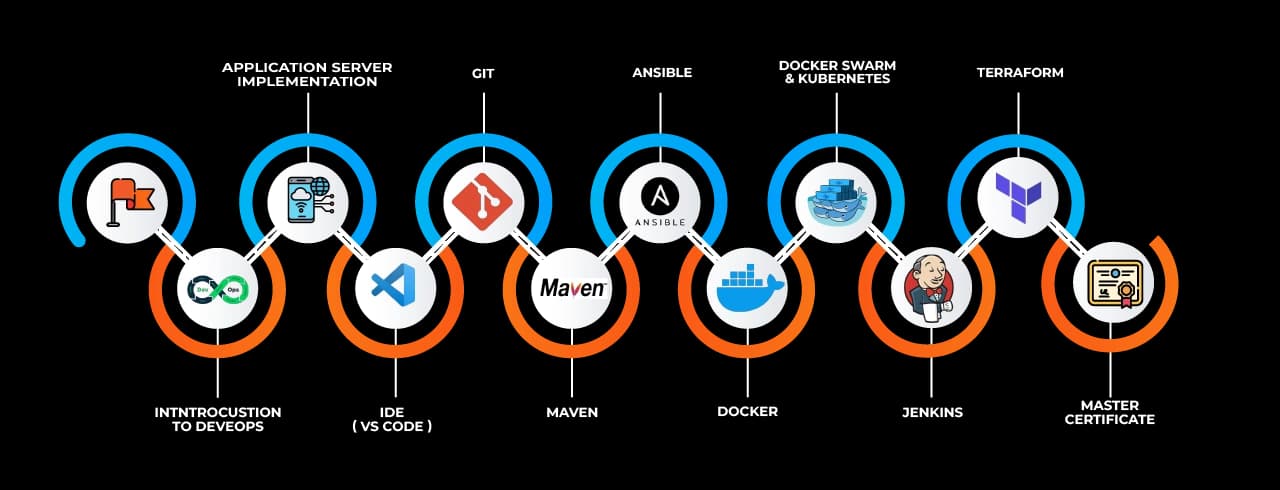
DevOps syllabus

12 modules, from fundamentals to job-ready practice.
  1. 01

    Introduction to DevOps

    • What is DevOps?: Understanding the core principles and practices of DevOps.
    • Why DevOps?: Exploring the benefits of DevOps in modern software development.
    • SDLC, Waterfall, Agile Models: Comparing different software development methodologies.
    • History of DevOps: Evolution of DevOps and its impact on IT workflows.
    • Future of DevOps: Emerging trends and the role of DevOps in the future of IT.
    • DevOps Goals: Key objectives, such as faster releases, automation, and collaboration.
    • Important Terminology: Common DevOps-related terms and concepts.
    • DevOps Perspective: Understanding DevOps from a business, development, and operations point of view.
    • DevOps and Agile: How DevOps complements Agile methodologies.
    • Overview of DevOps Tools: A look at popular DevOps tools for automation, CI/CD, and monitoring.
    • Configuration Management: Managing infrastructure and application configurations efficiently.
    • DevOps Prerequisites: Essential knowledge and skills required before learning DevOps.
    • What is CI/CD?: Introduction to Continuous Integration and Continuous Deployment and their importance.
  2. 02

    Application Server Implementation

    • Need for Application and Web Servers: Understanding the role of application servers in software deployment.
    • Deploy Tomcat Server in Different Environments: Setting up and managing Apache Tomcat across various platforms.
    • Setup and Configure Tomcat with Apache: Integrating Apache with Tomcat for optimized web hosting and application management.
  3. 03

    IDE (VS Code)

    • Introduction to VS Code Installation: Overview of Visual Studio Code and its benefits for development.
    • Interface and Workspace Overview: Navigating the VS Code UI, workspaces, and layouts.
    • Install VS Code on Windows and Linux: Step-by-step guide to setting up VS Code on different operating systems.
    • Extensions and Settings: Enhancing VS Code functionality with plugins and custom configurations.
    • VS Code Shortcut Keys: Boosting productivity with essential keyboard shortcuts.
    • VS Code and Git Integration: Managing source control and versioning using Git within VS Code.
    • VS Code Terminal: Utilizing the integrated terminal for command-line operations.
    • VS Code for Developers: Best practices for coding, debugging, and optimizing development workflows in VS Code.
  4. 04

    Version Control System (GIT)

    • What is Version Control System?: Understanding the need for version control in software development.
    • Types of Version Control Systems: Exploring centralized and distributed version control systems.
    • What is Git?: Introduction to Git as a distributed version control system.
    • Importance of Git: Key benefits of using Git for collaboration and code management.
    • Git Installation with Different Environments: Setting up Git on Windows, Linux, and macOS.
    • Commands and Operations in Git with GitHub: Learning essential Git commands such as:Initialize (git init), Status (git status), Add (git add), Commit (git commit)
    • Clone (git clone), Pull (git pull), Push (git push)
    • Difference (git diff), Reset (git reset), Log (git log), Show (git show)
    • Tag (git tag), Stash (git stash), Remove (git rm)
    • Advanced Git Operations: Working with: Branching (git branch), Merging (git merge), Rebasing (git rebase), Forking
    • Merge vs Rebase, Conflict Resolving, Deleting Remote Repositories: Understanding the differences and handling conflicts in Git.
    • Git Integration with Eclipse, VS Code: Configuring Git in popular IDEs for seamless version control.
  5. 05

    Maven (DevOps)

    • Introduction to Maven: Overview of Maven as a build automation and project management tool.
    • Maven Compared with Ant and Other Tools: Differences between Maven, Ant, and Gradle.
    • Maven Setup in Multiple Environments: Installing and configuring Maven on Windows, Linux, and macOS.
    • Maven Lifecycle: Understanding Maven build phases such as compile, test, package, install, and deploy.
    • Maven Repository Structure: Exploring local, central, and remote Maven repositories.
    • Real-Time Maven Settings for Projects: Configuring settings.xml for dependency management.
    • Maven Structure Coding and Implementation with Eclipse: Setting up and managing Maven projects in Eclipse.
  6. 06

    Ansible

    • Why is Configuration Management Needed?: Importance of automating system configuration in DevOps.
    • Introduction to Tools Like Ansible, Chef, Puppet: Comparison of configuration management tools.
    • What is Ansible?: Overview of Ansible as an agentless automation tool.
    • How Ansible Works?: Understanding Ansible architecture, YAML syntax, and SSH-based communication.
    • Ansible Setup and Configuration: Installing and configuring Ansible on different platforms.
    • Ansible Inventory Introduction: Managing inventory files and defining hosts and groups.
    • Ansible Ad-Hoc Commands: Running quick one-time commands using Ansible.
    • Managing Ansible Configuration File: Customizing Ansible settings using ansible.cfg.
    • Creating Playbooks with Structures and Conditions: Writing YAML-based automation scripts for tasks.
    • Managing Ansible Roles: Organizing playbooks into reusable and structured roles.
    • Real-Time Server Management: Automating configuration tasks in production environments.
    • Ansible Vault to Protect Ansible Playbooks: Encrypting sensitive information in playbooks.
    • Troubleshooting Playbooks: Debugging and fixing common Ansible errors.
  7. 07

    Docker

    • What is Containerization?: Understanding container technology and its benefits over traditional virtualization.
    • What is Docker?: Introduction to Docker as a containerization platform.
    • Docker Setup in Multiple Environments: Installing and configuring Docker on Windows, Linux, and macOS.
    • Docker Images: Understanding pre-built and custom Docker images.
    • Running Web App in Docker Container: Deploying and managing applications inside containers.
    • Dockerfile Creation and Deployment: Writing and using Dockerfiles to build custom container images.
    • Working with Docker Hub: Pushing and pulling images from the Docker registry.
    • Docker Ad-Hoc Commands: Basic commands like docker run, docker ps, docker exec, docker stop, docker rm, docker push, and docker pull.
    • Create Docker Image, Share with Others: Building custom images and distributing them via Docker Hub.
    • Create Your Own Private Docker Registry on Linux Server: Setting up a secure private Docker registry.
    • Manage Docker Volumes: Persisting data across container restarts using Docker volumes.
    • What is Docker Compose?: Defining and running multi-container Docker applications.
    • Manage Containers Using Docker Compose Files: Creating and managing complex applications with docker-compose.yml.
  8. 08

    Container Orchestration (Docker Swarm & Kubernetes)

    • What is Container Orchestration?: Overview of managing multiple containers efficiently.
    • What is Docker Swarm?: Introduction to Docker's native orchestration tool.
    • Working with Docker Swarm Using EC2 Instance: Setting up a Swarm cluster on AWS EC2.
    • Docker Swarm Lab Setup: Practical implementation of Docker Swarm for container management.
    • Comparison: Docker Swarm vs Kubernetes: Key differences between both orchestration tools.
    • Introduction to Kubernetes: Understanding Kubernetes as a leading container orchestration platform.
    • Installing Kubernetes Cluster: Setting up a Kubernetes cluster on cloud or on-premises.
    • Manage Kubernetes Master and Nodes: Understanding the control plane and worker nodes.
    • What is a Pod?: Exploring Kubernetes' smallest deployable unit.
    • Managing Pod Network with Example: Configuring networking within Kubernetes.
    • Manage Scaling, Labels & Selectors: Scaling applications dynamically and organizing workloads.
    • Replication Controller: Ensuring the desired number of pod replicas run at all times.
    • Replica Set: Managing scalable pod deployments with better control.
    • Deployment: Deploying and updating applications efficiently using Kubernetes Deployments.
    • Resource Quota and Horizontal Scaling: Managing resource limits and auto-scaling workloads.
    • Volume Management: Handling persistent storage in Kubernetes environments.
  9. 09

    Jenkins

    • Jenkins – Continuous Integration: Understanding Jenkins as a CI/CD tool.
    • Introduction to Jenkins: Overview of Jenkins automation server and its use cases.
    • Installation and Configuration of Jenkins: Setting up Jenkins on Windows/Linux.
    • Jenkins Users and Roles Management: Configuring access control and user roles.
    • Jobs in Jenkins: Creating and managing build jobs.
    • Jenkins Node Setup and Configuration: Setting up master-slave architecture for distributed builds.
    • Jenkins Integration with Git (SCM): Automating build and deployment pipelines using Git repositories.
    • Jenkins Integration with Docker and Ansible: Automating containerized deployments and configuration management.
    • Auto Deployment with Jenkins using Git, Maven, and Tomcat Server: End-to-end CI/CD pipeline for Java applications.
  10. 10

    Terraform

    • Understand Infrastructure as Code (IaC) Concepts: Introduction to IaC and its benefits.
    • Understand Terraform's Purpose (vs Other IaC Tools): Comparing Terraform with CloudFormation, Ansible, and Pulumi.
    • Understand Terraform Basics: Overview of Terraform’s working principles.
    • Introduction to Terraform: Understanding Terraform’s architecture and workflow.
    • Infrastructure Automation: Automating cloud infrastructure provisioning.
    • Install Terraform: Setting up Terraform on Windows, Linux, and macOS.
    • Providers: Understanding cloud providers like AWS, Azure, and GCP in Terraform.
    • Resources: Defining and managing infrastructure components using Terraform.
    • Basic Syntax: Writing Terraform configuration files (.tf).
    • Terraform Plan, Show, Apply, Destroy: Managing infrastructure lifecycle.
    • Exploring Terraform Registry: Using pre-built Terraform modules and providers.
    • Terraform Console and Output: Debugging and viewing Terraform outputs.
    • Terraform Variables: Using variables for dynamic configurations.
    • Breaking Out Our Variables and Outputs: Structuring Terraform configurations efficiently.
    • Manage AWS Infrastructure Using Terraform: Provisioning AWS services like EC2, S3, and RDS.
  11. 11

    Grafana and Prometheus

    • Download Prometheus and Node Exporter: Installing Prometheus for monitoring.
    • Install Prometheus Node Exporter: Setting up Node Exporter for system metrics.
    • Install and Configure Prometheus: Configuring Prometheus to scrape system metrics.
    • Configure Prometheus for Grafana: Connecting Prometheus as a data source in Grafana.
    • Check Prometheus Metrics in Grafana Explore View: Querying and visualizing real-time metrics.
    • Start Building Dashboards: Creating custom dashboards for monitoring infrastructure.
  12. 12

    DevOps Projects

    • Project 1: Simple DevOps Project for CI/CD Using Jenkins: Implementing a basic CI/CD pipeline using Jenkins.
    • Project 2: CI/CD Pipeline Using Git, Jenkins, Ansible, and Docker: Automating build, test, and deployment processes.
    • Project 3: AWS Infrastructure Management Using Terraform: Managing cloud infrastructure using Terraform scripts.
DevOps Course learning curve
DevOps learning curve

Tools you'll work with

  • DevOpsA culture and practice that integrates software development and IT operations for faster and more reliable releases.
  • CI/CDA methodology for automating code integration, testing, and deployment to improve software delivery speed.
  • Continuous IntegrationThe process of automatically integrating code changes into a shared repository multiple times a day.
  • Continuous Delivery/DeploymentAutomating software releases to ensure reliable updates with minimal manual intervention.
  • GitA distributed version control system used for tracking code changes and collaboration.
  • JenkinsAn open-source automation tool for implementing CI/CD pipelines.
  • MavenA build automation tool primarily used for Java projects, managing dependencies and builds.
  • AntA Java-based build tool for automating software compilation, testing, and deployment.
  • AnsibleA configuration management tool for automating IT infrastructure and application deployment.
  • TerraformAn IaC tool used to define and provision cloud infrastructure using declarative configuration files.
  • ContainerA lightweight, portable, and consistent runtime environment for applications.
  • DockerA containerization platform that enables developers to package, distribute, and run applications in isolated environments.
  • PodmanA daemonless container engine that provides a secure alternative to Docker.
  • KubernetesA container orchestration system for automating deployment, scaling, and management of containerized applications.
  • Docker SwarmA native clustering tool for managing and orchestrating Docker containers.
  • SDLCThe Software Development Life Cycle, outlining stages from planning to maintenance in software development.
  • TomcatAn open-source Java application server used for deploying Java-based web applications.
  • Apache HTTPDA widely used open-source web server for hosting and serving web applications.
  • VSCodeA lightweight yet powerful code editor with support for debugging, Git, and extensions.
  • IaC (Infrastructure as Code)Managing and provisioning infrastructure using machine-readable scripts instead of manual processes.
Projects you'll build

  • Simple DevOps Project for CI/CD using Jenkins

    Simple DevOps Project for CI/CD using Jenkins

    Build your first CI/CD pipeline in Jenkins that automatically builds, tests and deploys an application on every change.
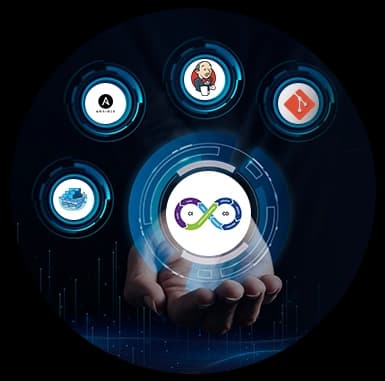
    • Jenkins
    • Docker
    • Git
  • CI/CD Pipeline using Git, Jenkins, Ansible, and Docker Swarm/Kubernetes

    CI/CD Pipeline using Git, Jenkins, Ansible, and Docker Swarm/Kubernetes

    Create an end-to-end pipeline that uses Git for source control, Jenkins for automation, Ansible for configuration and Docker Swarm or Kubernetes to run the containers.
    • Git
    • Jenkins
    • Kubernetes
  • AWS Infrastructure Management using Terraform

    AWS Infrastructure Management using Terraform

    Describe AWS infrastructure as code with Terraform and provision scalable, secure environments with almost no manual steps.
    • Jenkins
    • Git
    • Kubernetes
  • Continuous Integration and Continuous Deployment without Downtime

    Continuous Integration and Continuous Deployment without Downtime

    Design a pipeline that releases without downtime, using blue-green or rolling deployments so users never notice an update.

    • Docker
    • Kubernetes
    • Git
  • Terraform and Ansible Smart Combination for Managing Infrastructure & Software Configuration

    Terraform and Ansible Smart Combination for Managing Infrastructure & Software Configuration

    Use Terraform to provision the infrastructure and Ansible to configure the software on it, so every environment comes out identical.

    • Kubernetes
    • Docker
    • Jenkins

What a lab session looks like

lab-session
student@devops:~/app$ docker build -t lab/webapp:1.2 .Successfully tagged lab/webapp:1.2student@devops:~/app$ kubectl set image deployment/webapp web=lab/webapp:1.2deployment.apps/webapp image updatedstudent@devops:~/app$ kubectl get pods -l app=webappNAME                      READY   STATUS    RESTARTS   AGEwebapp-6d9f7c8b5d-4kq2x   1/1     Running   0          32swebapp-6d9f7c8b5d-p8wzl   1/1     Running   0          27sstudent@devops:~/app$ 
Building a new image and rolling it out to Kubernetes, then confirming both replicas are running the update.

Certification path

  1. 1

    Linux and Git basics

    Command-line administration, scripting and version control are the base for every DevOps tool.

  2. 2

    Cloud associate

    AWS Solutions Architect - Associate or Azure Administrator (AZ-104) to understand where pipelines deploy.

  3. 3

    Certified Kubernetes Administrator (CKA)

    A hands-on, performance-based exam from the Linux Foundation and CNCF on running Kubernetes clusters.

  4. 4

    Professional DevOps credentials

    AWS Certified DevOps Engineer - Professional or HashiCorp Terraform Associate, depending on your stack.

Job roles after this course

  • DevOps Architect
  • Release Manager
  • DevOps Engineer
  • Security Engineer
  • Software Developer
  • Automation engineering
  • Software Testing
  • DevOps specialist
  • DevSecOps Engineer
  • Integration Specialist
  • Systems engineering
  • Automation Expert
  • Quality Assurance
  • Reliability engineering

Enquire about this course

Request a call back

A counsellor replies with the right course, current fees and batch details.

We only use these details to reply to your enquiry.

About the DevOps course

About the DevOps course

DevOps brings development and operations together so software can be built, tested, released and maintained without the usual hand-off delays. Our course is built around hands-on workflows: automation, CI/CD pipelines, cloud deployments, monitoring and containers, using Git, Docker, Kubernetes, Jenkins, Ansible, Terraform and AWS or GCP throughout.

Rather than memorising commands, you follow code from a developer's laptop to production and see how automation cuts errors and lets teams release faster. The syllabus reflects how teams work today: branching strategies, automated builds, cloud provisioning, container orchestration and monitoring. By the end you can build a complete CI/CD pipeline and manage environments that scale.


What DevOps is and why it makes a good career

DevOps skills are in strong demand because almost every organisation that builds software, from web and mobile apps to SaaS products and enterprise systems, needs people to automate releases, run cloud systems and keep them reliable.

DevOps engineers work across development, cloud, automation and monitoring, which makes the profile very versatile. Pay grows with experience and depth, especially in Docker, Kubernetes, Terraform and AWS.

The course combines cloud fundamentals, automation, infrastructure as code, team collaboration and real pipeline building, so you can contribute to a DevOps team from the start.


What a DevOps certification shows

Completing the course shows you can handle continuous integration and delivery, cloud deployments, containerised applications and modern automation practices in real projects.

This certification validates skills in:

  • Git & GitHub workflow
  • CI/CD pipeline creation 
  • Jenkins & GitLab C
  • Docker containerization
  • Kubernetes cluster management
  • Infrastructure-as-code using Terraform or Ansibl
  • Cloud setups on AWS or GCP
  •  

These skills fit roles such as DevOps Engineer, Build and Release Engineer, Cloud Administrator, Site Reliability Engineer, Automation Engineer and Platform Engineer, in service companies, product firms and cloud start-ups alike.


What you learn in the DevOps course

The course covers the whole software delivery life cycle, from writing code to running it in production. You learn how to:

  • Automate builds and deployments
  • Manage cloud servers
  • Set up containerized applications
  • Maintain monitoring systems
  • Implement CI/CD pipelines
  • Handle version control effectively
  • Manage secure and scalable infrastructure
  •  

The focus is always on helping learners understand how real DevOps teams work in actual companies.


Tools and skills you take away

Learners gain hands-on experience with the most demanded DevOps tools including:

  • Git & GitHub for version control
  • Jenkins & GitLab CI for optimized pipelines
  • Docker with Kubernetes to generate container based usage
  • Ansible Terraform for automation and IaC
  • AWS / GCP / Azure cloud platforms
  • Prometheus Grafana ELK for monitoring and logging
  •  

These tools are essential in organizations where developers and operators work closely to ship reliable updates quickly.


Why projects matter in DevOps

DevOps only makes sense in practice, so you work on real project tasks such as:

  • Building CI/CD pipelines for applications
  • Containerizing and deploying apps with Docker
  • Running Kubernetes clusters
  • Cloud provisioning using Terraform
  • Configuration management tasks using Ansible
  • Setting up monitoring dashboards
  •  

The projects include realistic problems like failed builds, broken deployments and scaling issues, so you learn to troubleshoot under pressure and build the confidence a DevOps role needs.


Why learn DevOps with us

You get structured assignments, up-to-date notes, lab practice, walkthroughs of real projects and focused mentoring.

The aim is that you can create pipelines, deploy to the cloud, automate builds and run containers as soon as the course ends, because DevOps roles expect practical, experience-based skills.


Learning through projects

Instead of only theory students work on tasks such as:

  • Multi-stage CI/CD pipelines
  • Kubernetes deployments
  • Infrastructure provisioning using Terrafor
  • Monitoring dashboards using Prometheus & Grafana
  • Cloud-based application hosting workflows
  •  

Your projects build into a portfolio you can walk through in interviews to show real hands-on ability.


Tools and technologies covered

The DevOps Course covers all essential modern tools used in 2025 including:

  • Git GitHub
  • Docker Kubernetes
  • Jenkins GitLab CI Argo CD
  • Terraform Ansible
  • AWS Azure Google Cloud
  • Prometheus Grafana ELK Stack
  •  

You come away able to manage cloud-native systems and automation pipelines in line with current industry practice.


Help with your job search

Our placement support includes:

  • Resume preparation
  • Mock technical interviews
  • HR and communication rounds
  • Aptitude training
  • Technical tests
  • Referrals to hiring partners
  •  

DevOps skills are used in IT services, telecom, SaaS, banking, e-commerce and cloud infrastructure companies. We help you prepare and share suitable openings, but no institute can promise a job.


Ways to learn

The DevOps Course is offered through:

  • Classroom Training
  • Online Instructor-Led Training
  • Hybrid Modes
  •  

Online DevOps classes combine live sessions, recordings and assignments with doubt-clearing support, which suits working professionals.


Careers and where DevOps is used

DevOps engineers work in IT services, cloud providers, automation companies, product firms, security, banking technology and beyond: anywhere software is deployed automatically and has to scale.

Understanding CI/CD, containers, monitoring and cloud architecture lets you take ownership of reliability and performance in a modern development team.


Learn DevOps online

Online DevOps batches include live sessions, cloud lab access, assignments, doubt support and project mentoring, with the same depth as the classroom and the flexibility to learn from anywhere.


Corporate DevOps training

For IT teams modernising how they ship software, we run tailored DevOps sessions on automation, CI/CD, cloud infrastructure, scalable architecture, monitoring and team workflows, helping them release faster and run more reliably.

DevOps FAQs

Can a fresher get into DevOps?

Yes, though it is usually easier after some Linux or cloud experience. Freshers who show a complete, documented pipeline project on GitHub, from commit to Kubernetes deployment, give interviewers something concrete to discuss.

What is the difference between DevOps and cloud computing?

Cloud computing is about the infrastructure itself: networks, servers and storage from providers like AWS. DevOps is about automating how applications are built and delivered onto that infrastructure, so the two overlap heavily and many roles need both.

Is Kubernetes covered in depth?

Yes. You will deploy, scale, update, roll back and troubleshoot workloads with kubectl, use ConfigMaps, Secrets and Ingress, and package apps with Helm, which lines up well with CKA preparation.

Do I need to know Python for DevOps?

Basic Python helps but is not mandatory at the start. Bash scripting and fluency with YAML matter more early on, and Python becomes useful as you automate more complex tasks.

What are the DevOps course fees and batch timings?

They change with each intake, so we provide them on request instead of listing them here. The enquiry form or a call gets you the current batches, timings and fees.

Should I learn Linux or cloud before DevOps?

Linux first is essential, and cloud basics are strongly recommended. If you are new to both, our Linux course followed by cloud computing gives you the base this course assumes.

Is placement support available after DevOps training?

Yes. We review your resume and project documentation, run mock interviews on pipeline and Kubernetes scenarios, and share relevant openings. We do not promise placement, but we help you present your skills clearly.

Page last reviewed on .